The wizard
+ New Event asks three questions. Nothing here is final — every answer can be changed later.
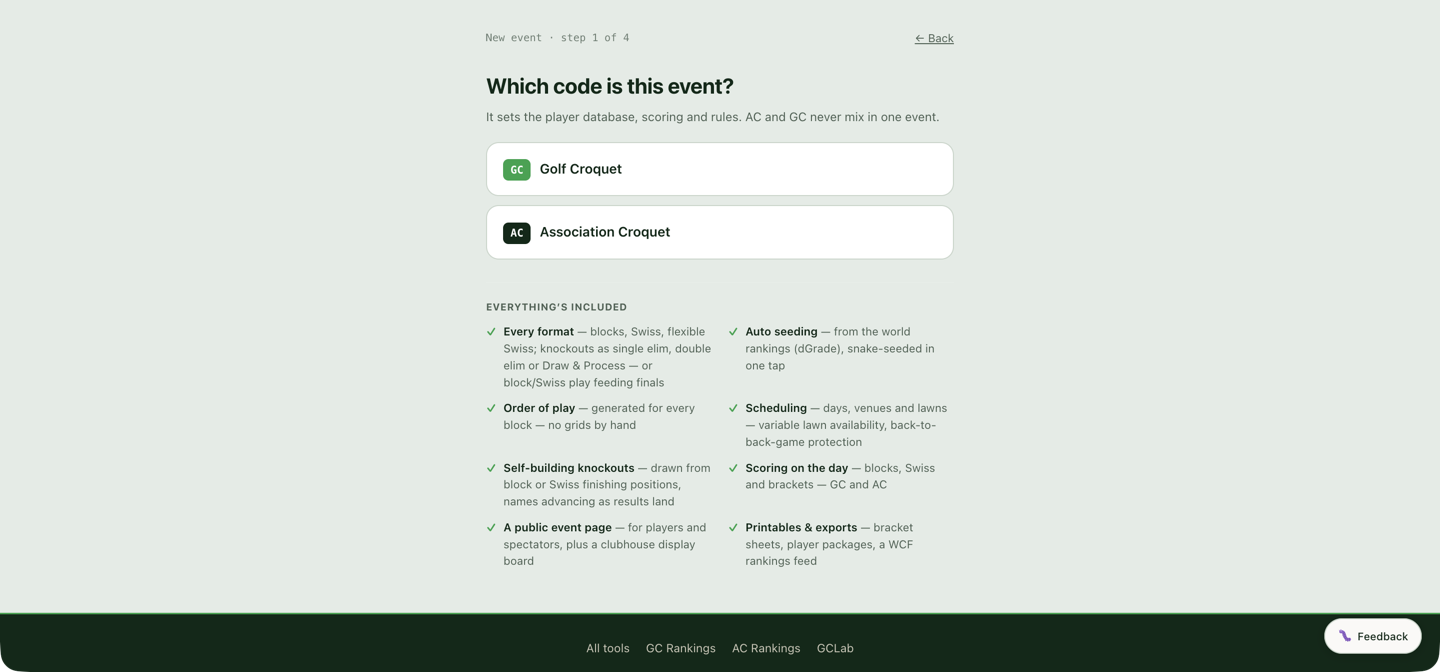
- Which code is this event? — four cards: Golf Croquet, Association Croquet, Advantage Golf Croquet (Golf Croquet played off handicaps), or American Six Wicket. It sets the player database, the scoring and the rules, and codes never mix in one event.
- Singles, doubles, or both? — "Both" builds a singles draw and a doubles draw inside one event, with one shared player list. The answer can be changed at any time afterwards with Event type on Players: switching a singles event to Both adds a doubles draw and keeps the singles as it is.
- Name it and set the dates — event name, start date, and end date (leave the end blank for a one-day event).
The wizard does not ask how many competitions your event has. It makes one (two with "Both" — a singles draw and a doubles draw), and you add the rest on Format whenever you know them. Understanding competitions and formats at the top of that section explains which events need more than one: a Championship and a First Flight are two, because the field was split before anyone played; a knockout with a plate and a Z is one, because everyone started level. Handovers between competitions — a plate taking the players your main draw knocks out — are set up on Pathway.
Finishing drops you on the Players section with the quick-start checklist showing what comes next.
Every screen after the first also has "Set up myself instead →" if you'd rather skip the questions and work through the sections directly.
Advantage Golf Croquet
The third card is the one place the handicap system is chosen. An Advantage event is a Golf Croquet event in every other respect — GC players, GC dGrades, GC rules — but every game starts 0–0 with each side playing to its own target score, read from the players' handicaps, and blocks order on net SF rather than net hoops. There is no switch for it on Details afterwards, so pick it here if the event is being played that way. Advantage Golf Croquet is the full article.
American Six Wicket
The fourth card makes an American Six Wicket event, shown with an A6W badge on the event page and in event lists. It is scored the same way as Association Croquet — the same scoresheets, margins, standings and live board. There is no A6W player database connected yet, so players are not searched or matched against any rankings: they come in from Import a list or are typed in on Add player, with an optional handicap and estimated grade. Handicaps are shown beside each name from the start, and they rank the field wherever a dGrade would: Auto-assign splits players into competitions (Championship, First Flight…) by handicap, lowest first, and blocks snake-seed on handicap, with an estimated grade used for anyone without one. Equal handicaps are separated by USCA tracking points, highest first. Refresh dGrades and WCF Export do not appear on an A6W event. Like the Advantage card, this is chosen here and not on Details afterwards.
Picking the card asks one more question before the event is made: Level or handicap play?, with a Level play and a Handicap play (bisques) button. The USCA tracking points players earn depend on the answer. It can be changed later with Level or handicap play on Players.
Or start from a template
Below the code cards, accounts with a template available see Or start from a template: one row per template, with its name and a Use template button. The arrow beside the name opens a list of what the template sets up. A template is a set of answers to the format questions, made for one kind of event. Use template creates the event with those answers already in place and goes straight to the name and dates step, which then shows From the … template. The singles, doubles or both question is skipped, because the template answers it.
There is one template so far, WCF GC World Championship, shown only to accounts with the WCF Championship permission. It makes a Golf Croquet singles event with one competition, Championship, set up as:
- 8 blocks (the number of players is up to you), drawn on the max dGrade of the last 12 months, with both WCF draw rules on (countries spread across blocks, compatriots kept apart in the last round);
- block matches best of 3, games to 13, with the top 4 of each block qualifying;
- ties for qualifying places settled by play-offs (WCF placings), and other ties by net games then net hoops;
- a 32-player knockout seeded by Block Separation by Grade: best of 3 in the first two rounds, best of 5 from the quarter-finals.
Players are not added by the template. Nothing in it is fixed: every setting it makes sits in its usual place and can be changed there. What the event shows afterwards is described under Set by the template on Format, and the Plate under Set up the Plate.
A change to a template affects events created from it afterwards. Events already made keep the answers they started with.
Real or test
The last wizard step has a 🧪 Test event tick box; later, the same choice sits at the top of Details:
- Real event — one that's actually happening. It becomes publicly visible once it has a name and dates, unless you unlist it on the Event Page section.
- Test event — a private sandbox. Only you and people you invite can see it, it never appears in the public directory, and you can fill it with generated test players and scores.
Start real events as real events. A test event that turns out to be the real thing can be converted on Details, but real entrants and test data don't mix well — the tool will warn you.
Next steps
- Advantage Golf Croquet — target scores, how a game is won, and net SF.
- Getting started — the event list and roles.
- Quick start checklist — the guided path through setup.