What this section does
The schedule places every block match on a lawn at a time, within the rules you set. It has four views along the top: Plan (the settings), Schedule (the result, editable), Capacity (what the result costs), and Adjust (per-competition overrides — covered in Schedule adjustments). Set the plan, press Generate schedule, fine-tune by hand, then check Capacity before you publish.
Plan
Block play from / to
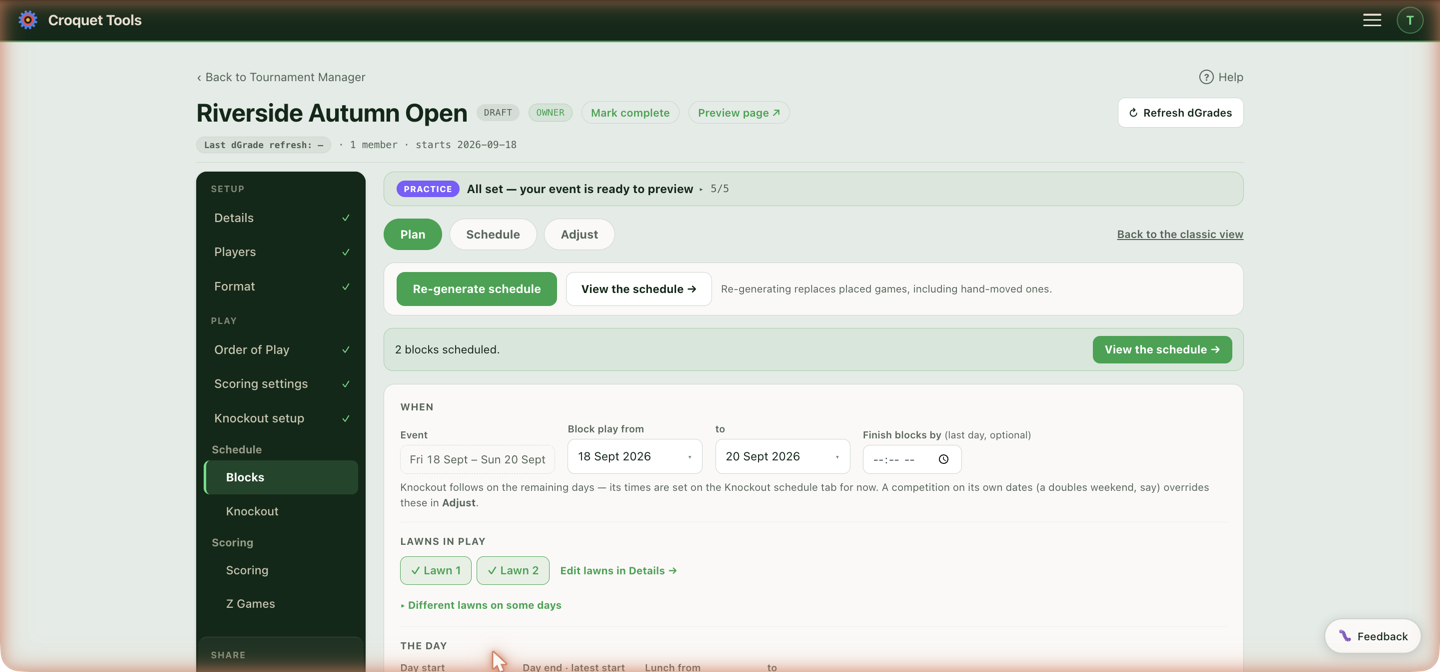
The days block play runs, within the event dates — end block play early and the remaining days are free for a knockout, with its own times on the Knockout schedule. Finish blocks by (optional) is a time on the last day of block play that the solver must finish by.
Lawns in play
Which of the event's lawns block play uses. The lawn list itself lives in Details; this just picks from it. Two folds cover per-day exceptions: ▸ Different lawns on some days here, and ▸ Different times on some days under the day settings. On a multi-venue event, moving one competition or block to the other club for some of its days is a separate setting — Venue by day on Schedule adjustments.
The day
Day start, Day end · latest start — the end time is the latest a game may start, not finish — and an optional lunch window, Lunch from / to. With a window set, Lunch is decides what it means:
- A stop — no games — no game starts inside the window and none runs through it; every lawn stops.
- Rolling — lawns keep running — games are placed through the window, and Each player free for at least N minutes is promised to every player instead: nobody is placed so that they are left with less than N free minutes inside the window that day. A stop costs every lawn the whole window; a rolling lunch costs no lawn time. If N is longer than the window itself, no game can be placed inside it and the window behaves as a stop. The schedule's conflict check flags a hand-moved game that closes someone's break, and a warning after generating names the days where games the solver did not place (a knockout, another competition) fill the window.
Games and rest
- Game slot — minutes of lawn time each match is given. The ★ figure is worked out from each competition's match format — game points, best-of, and singles or doubles, which is sized longer. With several competitions the suggestion is the longest of them, and the note under it says which one set the figure; give the shorter ones their own in Schedule adjustments if you want those lawns back sooner. A competition whose pairs meet twice back to back is placed one sitting at a time — the suggested slot holds both games, and each game is then written with its own start time, the second straight after the first on the same lawn. Moving one game of a sitting in the editor moves that game only.
- Min rest between games — the minimum gap any player gets between their matches.
- Max games in a row — how many back-to-back matches a player can be given before the solver must rest them. This is enforced at placement, not checked afterwards.
- Matches per player per day — a best-of-3 counts as one match. At least (a reporting floor: the Player days report names every day a player falls below it; nothing is moved by it) and At most (what the solver enforces, on every day; blank = no cap). Both can be set per competition on Adjust. Judge the last day too decides whether the floor applies to a competition's final day: off, that day is left alone, since its final round often carries over with the playoffs to follow; on, it is held to the floor like any other.
- Lawn sharing — four settings, with a Stagger in minutes for the second game on a lawn. Each one answers the same question: how many time slots will the schedule spend to keep one game per lawn? - Single-banked (one game per lawn) — no lawn ever holds two games. A round of 10 games on 8 lawns takes two slots. If the days cannot hold the event this way, the schedule reports the rounds that did not fit. - Share only if the event will not otherwise fit — every block is laid out single-banked first. A block shares lawns only when that leaves one of its own rounds with nowhere to go, and then only its first rounds, as many as it takes: a block one round short lets its first round share, which pulls the rest a slot earlier. Blocks that fit keep one game per lawn; when the lawn pool the blocks share is what binds, each block gives up one more round in turn. A round that shares runs in one slot, as below. The generated schedule names the blocks and rounds that share. A day finishes when its single-banked rounds are done, so it runs longer than under the next two settings. - Share to keep each round in one time slot — single-banked first as well, but once any round is left with nowhere to go, every round in the event with more games than lawns shares, so that it still runs in one slot: 10 games on 8 lawns pair up rather than take two slots. This measures “needed” against the round, not against the days available, so it trades sole use of a lawn for a shorter day. - Always double-bank — two games on every lawn wherever a round has more games than lawns, whether or not the days need it.
Shared games are spread across players rather than falling repeatedly on the same few. Blocks that share a lawn pool play side by side whenever their rounds fit on the free lawns, and take turns only when they don't. The Plan step's Double-banked: N of M games line under Will it fit is the count for the schedule that exists, broken down by competition.
- Balance players across lawns — spread each player's games over different lawns rather than parking them on one.
Printed output
How times and lawns appear on the event page (Schedule, Live and Following), the Print Pack, player schedules and the spreadsheet export. Set for the whole event here, and per competition or block where those settings override it.
- Printed times: every game shows its start time and lawn.
- Printed times — first game of the day only: each lawn's first game of the day shows its time and lawn (on a double-banked lawn, both games that open it). Every later game shows its place in its block's order that day, such as #4, and no lawn: it goes on the next free lawn at the block's venue.
- Order of play only: no game shows a time or lawn, only its place in its block's order that day.
When a game has no time, the event page's Schedule tab says why above the list, and the Following strip gives a player's next game as "4th in Block A's order". The generator still works out times underneath to build the order; only what is shown changes. Knockout games always show their time.
Order of competitions
When competitions share lawns: Interweave mixes every competition's games to finish as early as possible (the default); In order runs them one after another, with per-row control over which competitions run together and which wait.
The order of play is kept whatever it takes to fit: every player's rounds run in sequence, so a round the day cannot hold moves to the next morning rather than into an earlier gap, and a round that fits nowhere in sequence is reported as unfit instead of being placed out of turn.
Generate schedule
Builds the whole schedule from the plan with live progress; anything it had to compromise on is listed under The solver had things to say. Re-generate schedule replaces placed games — including ones you moved by hand — so hand-tune after the last generate, not before.
All competitions
The menu beside the button chooses which competitions a generate touches. Untick one and its placed games stay exactly as they are — the chosen competitions are placed around them, as around any booked lawn — and the button reads Re-generate 2 of 4 competitions. Competitions that share lawns on the same days are placed together, so tick them together: generating one alone treats the other's games as fixed and leaves it less room.
Scheduled knockout matches are fixed in the same way: block games are never placed under a knockout match that already has a time. To move block play into time a knockout currently holds, move the knockout first (see Knockout schedule), then generate.
Fixed slots
When the usual placement leaves games with nowhere to go, the generator tries again with fixed slots before reporting them. Every game starts on a slot — the day start, then one game slot after another up to the latest start, skipping a lunch stop — and the search chooses which slot each game takes. Its rules are the same as the usual placement's:
- nobody plays two games at once, and every player gets Min rest between games — with 70-minute slots and 45 minutes of rest, a player sits out at least one slot between games
- each player's games run in round order
- At most matches per day holds
- a competition set to Single-banked never shares a lawn; the others share only in a slot that has more games than lawns, and two games sharing a lawn start together
Two things are goals rather than rules: a block's rounds overlap by no more than one step, and each player's games spread evenly over the days. A rolling lunch is a goal here too; the result names, day by day, how many players have less than their lunch minutes inside the window.
The fixed-slot result is used only when it places every game. It is announced first under The solver had things to say (Placed in fixed 70-minute slots…). When it cannot place every game either, the usual placement's result and its suggestions stand. It needs every competition in the generate on one game slot and one set of day times and lawns; finish-by times may differ.
Worked example — two singles competitions (four blocks of 8, and a 5-a-side cross block), 137 games, 8 lawns, 70-minute slots from 08:00, latest start 16:15, 45 minutes' rest, over two days:
| Usual placement | Fixed slots | |
|---|---|---|
| Championship set to Single-banked | 108 of 137 placed | 137 of 137 placed |
| Slots each day | — | 08:00, 09:10 … 16:10 (eight) |
| Games sharing a lawn | — | First Flight only |
| Shortest rest | — | 70 min |
Schedule (the editor)
View By lawn, By time or By player, filtered by competition, block or player; ⛶ Full screen for a big board. Click and drag a game to move it; drop it on another game to swap them. By player shows one player's day with the gaps between games, and the Player days card below the editor flags days that fall below the minimum-games floor.
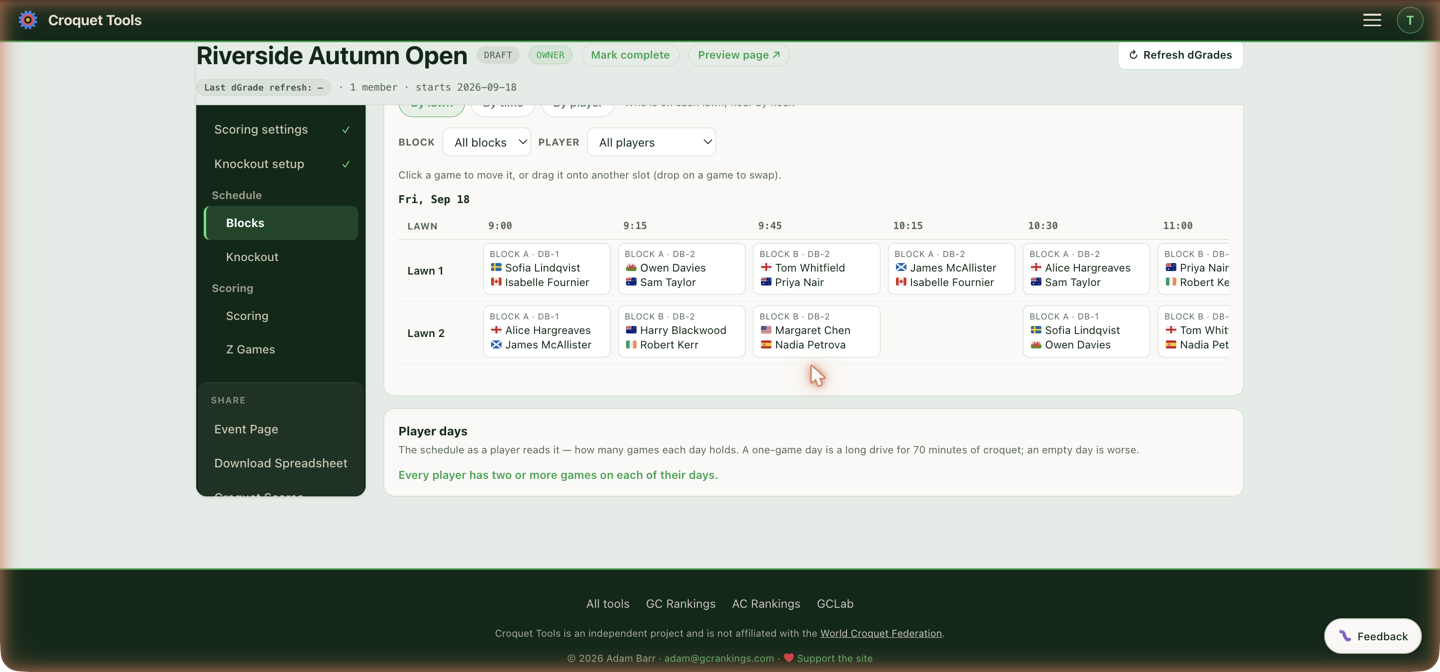
- Versions — snapshot the whole schedule (Save current as version) and roll back anytime. Take one before experimenting.
- Conflict checks — on by default; Save changes is blocked while conflicts exist. Pause checks to make a multi-step move — saving needs them turned back on and the board clean.
Import a schedule
Loads an order of play the organiser already has instead of generating one. Shown above the editor to the event's owner and managers, here and on the Knockout schedule tab. Each person can read up to 10 files a day.
Import a schedule… takes a file — a spreadsheet (.xlsx, every sheet is read), a Word file (.docx), a PDF, a photo — or pasted text. Read it sends it to an AI reader with the event's draw, which writes out one line per game: day, start and end, club, lawn and the two players. The lines are then matched to the draw: each name to a player (full names, initials such as "J. Smith", "Smith, John" and surnames alone when only one player has that surname), each pair to its game, each club and lawn to the event's lawns.
One file can hold block games, knockout games or both. A knockout game is matched to its bracket match by what the file says about it — the match number, the round and its place in the round ("QF2"), the players, or what feeds it ("Winner QF1 v Winner QF2") — because a knockout schedule is often written before the players are known. Its names are not checked against the players; when both names are players who aren't the ones the draw has in that match, the line is flagged and still imported.
The imported schedule becomes the rules. Nothing is checked against the Plan's days, hours, rest or games in a row. Instead, its first and last day, earliest and latest start, and game length (the commonest start-to-finish in the file, or the Plan's Game slot when the file gives start times only) are copied into the Plan when you import, and Finish blocks by is cleared.
What is checked is that the right people play the right games:
| Shown as | What it means | Imported? |
|---|---|---|
| Matches no one / could be more than one player | A name that isn't a single player in the draw | No |
| Not a game in the draw / in different blocks | Two players the draw never pairs | No |
| Listed twice | A game the schedule places more often than the draw has it | The first one only |
| Also playing at … | A player in two games at the same time — both lines are flagged | No |
| No date / no start time | A line that can't be placed | No |
| Three games on this lawn | More than two games on one lawn at once | No |
| Imported without a lawn | A club or lawn that isn't one of the event's | Yes, with no lawn |
| Shares the lawn (double-banked) | Two games on one lawn at once | Yes |
| Knockout match … isn't in the draw | A knockout line the reader couldn't tie to a bracket match | No |
| This knockout match is listed twice | A bracket match placed by two lines | The first one only |
| The draw has … in … | A knockout line whose players aren't the ones the draw has in that match | Yes |
| Block games / Knockout games the schedule doesn't place | Games in the draw with no line — listed only for the part the file covers | Stay unscheduled |
Lines with a problem lists only the flagged lines; Every line shows them all, with the game each line was matched to. Import N games replaces the schedule of each part the file covers — it asks first. Block games replace the block schedule and copy the file's days and hours into the Plan. Knockout games replace the knockout schedule: knockout matches the file leaves out lose their times, except matches with a result, which keep theirs, and the knockout days widen to cover every imported day. A file of knockout games only leaves the block schedule alone, and the other way round. The result is an ordinary schedule: move games by hand, check Capacity, print it. The blocks must be drawn (with an order of play), or the knockouts built, before importing, because a line can only be placed on a game that exists.
Capacity
Everything the finished schedule costs, recomputed from the placed games each time you open it — so it describes the schedule you have, not the plan that made it. Available once a schedule exists.
Include knockouts folds in every bracket match that has been given a time on the Knockout schedule, so you can see the whole week's lawn use rather than block play alone. A knockout match holds one lawn for one interval whatever its best-of, so it counts toward games, sharing, when a day starts and ends, and lawn use. It adds nothing to the player counts, turnarounds or longest days: until results resolve them, a bracket match's two sides are feed labels rather than people, and counting them would invent entrants and fabricate breaks. The toggle is hidden until at least one bracket match has a time.
Six figures across the top: games placed, what share of them are double-banked, how many of the event's days are in use, lawns in use (on an event with several clubs each lawn is counted with its club, so two clubs' "Lawn 1" are two lawns, and the tile names how many clubs), how many people those entries represent, and clashes. Clashes is the one to read first — anything other than zero means someone is in two games at once.
Day by day
One row per event day, including days with nothing on them. Peak is the most games in play at once. Lawn use is game-hours against lawn-hours open: under 100% means lawns are standing empty at some point, over 100% is only possible because games are sharing lawns, and it is the clearest read on how hard a day is being pushed. A day at 145% is carrying about one and a half games per lawn for its whole length.
By competition
Games, share double-banked, games per day per entry, the busiest and lightest day anyone has, and the shortest, longest and median turnaround. A single figure under Per day means every entry in that competition carries the same load; a range means they don't. Click a row for that competition's days, its round numbers, and who holds the shortest break and the longest day.
A break is measured from the end of one game to the start of that side's next on the same day. Breaks and day lengths are counted per person across every competition someone is in, so a player in the singles and the doubles has one day, not two.
Turnarounds
Every gap in the event, grouped. The bar on the shortest gap is picked out because that is the schedule's slack: a turnaround on the floor has none left, so a game that runs long pushes the next one late instead of being absorbed. A high count there means the day has no give in it.
Download PDF
Writes the whole summary — headline figures, day by day, every competition and its days, the turnaround spread and the longest days — as a landscape PDF to hand to a committee or pin up in the office.
Gotchas
Re-generate replaces hand-moved games. The generator solves from the plan; it doesn't know which placements were deliberate. Save a version first if you're regenerating a schedule you've touched.
Related
- Schedule adjustments — per-competition dates, lawns and rules.
- Order of Play — the matches being scheduled.
- Knockout schedule — bracket times, which Capacity covers only with Include knockouts on.