What this section does
Everything about a competition's knockout lives here: who goes through, the shape of the draw, the match format round by round, and what everyone else plays. One Create builds it all — slots show as positions ("Block A 1st") and fill with names as qualifying finishes, so you can build and print brackets before a single block game is played.
If the event has no knockout yet the rail shows this section dimmed; opening it offers Set up a knockout.
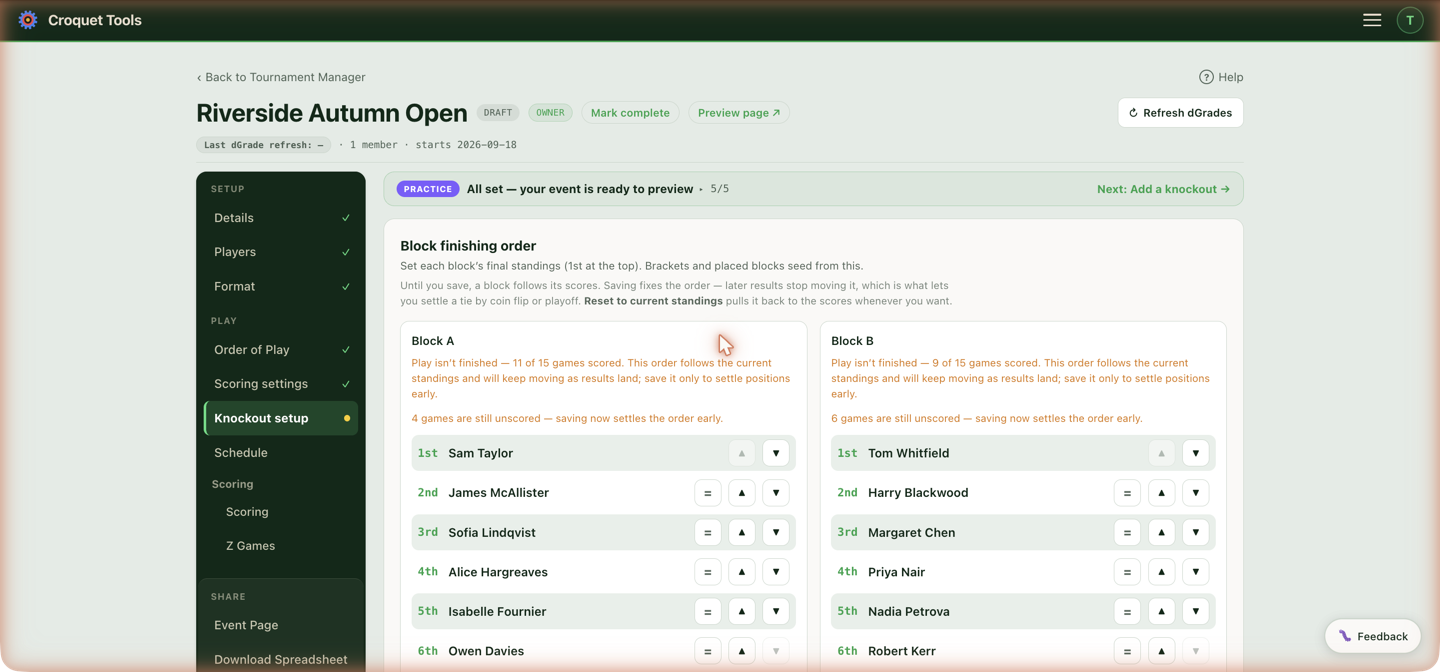
Block finishing order
Brackets and placed blocks seed from each block's final standings — set here, 1st at the top. Until you save, a block follows its scores. Save finishing order fixes it: later results stop moving it, which is what lets you settle a tie by coin flip or playoff. Mark players = to record a joint placing, and Reset to current standings pulls the order back to the scores whenever you want.
Seeding
Shown only for a competition with blocks — a knockout-only competition has no block finishers to place, and its seeding is the Seed order in the wizard below. Three styles for placing qualifiers into the bracket:
- Block-protected (no same-block R1) — spreads block-mates apart so they can't meet in the first round, and makes no promise after it.
- Ranking-tiered (balanced draw, by dGrade) — a balanced draw by rating, regardless of blocks.
- Tiered + separated (block-mates spread across the draw) — the ranking-tiered draw, with each tier permuted so block-mates meet as late as the draw allows.
▶ Compare the draws each method builds puts the methods side by side for this competition's blocks: the first round each produces, what sits in each half, and the round two players from one block could first meet. ▶ How does seeding work? walks a full example, and Seeding covers the styles in full. Re-seed existing re-deals a bracket you've already built.
When the blocks played each other
A competition set to cross-block play on the Format tab draws differently, and neither style above applies to it. Under cross-block play nobody has met a block-mate and everybody has met the whole other half, so spreading block-mates apart would put two players who have already played in every opening tie.
The half is also the only sound comparison. In two halves of five, A1 to A5 all played exactly B1 to B5 — identical schedules, so ranking inside a half rests on the same evidence for everyone. A record from one half cannot be set against a record from the other, because the two halves faced different fields.
So with two cross-playing blocks the draw pairs each half against itself — the top two of one half meet, the top two of the other meet, and the halves come together only in the final, where the one result they did decide is replayed for the title. This is chosen for you; there is no setting. With three or more cross-playing blocks the draw falls back to the block-protected interleave, since "who has met whom" is no longer a clean split.
The knockout wizard
Seed order
A straight knockout has no qualifying stage, so the wizard asks for the seed order rather than a qualifier count — the entrants are the seeds. They are listed 1 to n, prefilled by dGrade, with arrows to move anyone; First round it produces previews the pairings from the same sequence the bracket is built with, so the preview can't drift from the draw. Seeds — None, Top 2, 4, 8, 16, All, or a typed number — says how many hold their places; the rest are marked to draw and nothing is shuffled until you make the draw with Draw now or by committing to a round (see Draw record). Create waits until that draw has been made.
Reorder when dGrade isn't the truth — high-low doubles pairs, for instance, are near-identical in combined strength.
Seeds
How many of the field are seeded. *All n*** places every entrant by dGrade, top to bottom: the order is the draw, and that is what the wizard does if you change nothing.
Top 2, Top 4, Top 8, Top 16, or any number typed into the box, seeds that many by dGrade and draws the rest at random beneath them. None draws the whole field — an unseeded knockout. Rows carry a seed or drawn marker so the two are distinguishable, and Draw again re-draws the unseeded without disturbing the seeds. Changing the number re-takes the seeds from dGrade and re-draws, so the answer means the same thing however often you change it.
Worked example, 20 entrants with Top 4: the four highest dGrades hold seeds 1–4, and the other 16 are drawn at random into places 5–20.
The draw uses the browser's cryptographic random source with rejection sampling, so every ordering is exactly equally likely — no modulo bias.
Byes go to the top of the order. With a partial seeding the seeds take theirs first and any remaining byes fall to whoever the draw put nearest the top. Where do the byes go? can change that.
Nothing is written until Draw the bracket →, so nudge anyone with the arrows first; Save order only stores the order without building a bracket.
Until the button is pressed the wizard is a preview: an amber Not drawn yet note sits above it, there are no knockout games to schedule or score, and the Knockout schedule tab does not appear. On a competition whose format is Knockout, the next-step button at the foot of the tab warns that the bracket isn't drawn and asks before leaving.
How many from each block go through?
Top 1 / Top 2 / Top 3 / Top 4, All (shown when blocks have more than four players), a free number, or a different count per block. When everyone goes through, What does everyone else play? is not asked, since nobody is left over. The live line shows what it produces — "→ a main draw of 6 in a 8-bracket with 2 byes" — and this answer also sets the qualifying line shown in the standings.
It also shapes the WCF Regs round order: the games between the seeds either side of the qualifying line are dealt into the closing rounds, and which seeds those are depends on this number.
The question is asked earlier too — on Format, when you answer A knockout — and this field is prefilled from that answer. Answering it there means the order of play is built for the right number first time. If pairings were already generated when Create changes the number, they are rebuilt into the same rounds and keep their scheduled times and lawns; if a result has already been recorded the rebuild is refused, and the tool tells you the order of play still reflects the previous number.
This is also the only place that takes a different count per block.
For a Burridge Swiss the question reads Who goes through? and nobody picks the number: everyone who reaches the Wins to qualify set on Format goes through. While games remain the card shows an estimate (or the exact Qualifiers wanted count, when set); once every announced round is played it shows the players who actually qualified, and the draw is built for exactly them.
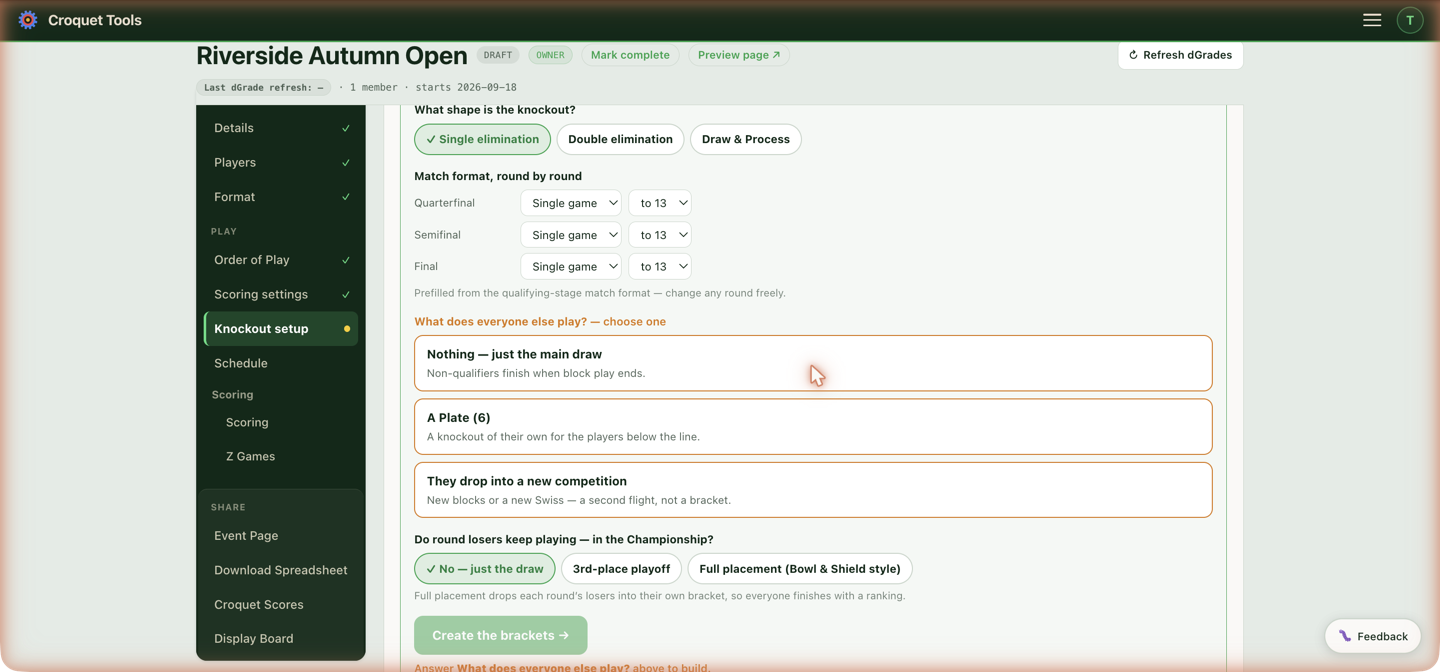
What shape is the knockout?
Single elimination, Double elimination (with a choice of a second final if necessary, or one final only), or Draw & Process.
On the event page's Knockouts tab, a double elimination viewed as a whole draw has one line above it explaining the format: a player is out after two losses. With the reset, it adds that the Losers-bracket finalist has to beat the Winners-bracket finalist twice in the grand final. A two-halves draw adds how the halves cross over and meet in the Final.
On an American Six Wicket event, Double elimination also has a Layout choice: One draw or Two halves, crossing over. See Two halves, crossing over.
#### Two halves, crossing over
A double elimination split into a top half and a bottom half. Each half has its own Winners bracket, its own Losers bracket and its own grand final. The Winners bracket ends at the two half finals, so it has no overall Winners final.
The losers of each half's early Winners rounds drop into that half's Losers bracket. The beaten finalist of each half's Winners bracket drops into the other half's Losers bracket instead. In a 12-player draw, the loser of the top half's Winners final plays the last round of the bottom half's Losers bracket, and the reverse.
Each half's grand final is that half's Winners champion against its Losers champion. With Reset (second final if necessary), a second game is played only if the Losers champion wins the first. The two half champions then play a Final. The Final uses the Grand final format row (labelled Final in the manual builder). The half grand finals use All rounds.
The draw is seeded as one draw, so seed 1 heads the top half and seed 2 the bottom half. It needs 6 or more players, three in each half. With fewer, an ordinary double elimination is built.
The halves are built in the same three sections as an ordinary double elimination. Winners holds both halves, top half first. Losers holds both halves' Losers brackets, top half first in each round. Grand Final holds the two half grand finals, their resets and the Final.
On the event page's Knockouts tab, the whole draw is shown half by half. Each half has its own panel with its Winners row over its Losers row and its grand final at the end, and the Final is shown below both panels. Byes are not drawn: a player with a bye appears first in the round they play. Over each Losers match a line names who dropped in and from which Winners match. A player who crossed over from the other half is named in gold.
A Draw & Process builds three brackets: the Draw, the Process (the same field rearranged so players who meet early in one meet late in the other), and a deciding Final between the two winners. When the same player wins both the Draw and the Process, the Final is not played: its row in Scoring reads Won the Draw and the Process — the winner outright, it has no Score button, and that player is the winner on the event page and in the results files.
Match format, round by round
Best-of and game points per round, prefilled from the qualifying-stage match format — change any round freely. Double elimination and Draw & Process take one All rounds format plus a Grand final / Deciding final row instead, with per-round tweaks made later in Scoring settings. In a double elimination built as two halves, the Grand final row sets the Final between the two halves.
What does everyone else play?
- Nothing — just the main draw — non-qualifiers finish when block play ends.
- A Plate (n) — a knockout of their own for the players below the line, with its own format and its own answer for what plate losers play.
- They drop into a new competition — new blocks or a new Swiss: a second flight, not a bracket.
On a Burridge Swiss whose plate was made with Add the plate, the question is not asked: the card names the plate instead, which is drawn from its own competition — see Plate off a Burridge Swiss.
Do round losers keep playing?
For a single-elimination main draw: No — just the draw, a 3rd-place playoff, or Full placement (Bowl & Shield style) — each round's losers drop into their own bracket, so everyone finishes with a ranking.
How a losers' bracket is paired
A bracket fed by one round's losers — a plate, a First Flight, a placement playoff — pairs them straight across: the loser of C1 plays the loser of C2, C3's plays C4's, and so on down the sheet. The losers' bracket is the mirror of the draw above it, so the pairs whose winners would have met in the next round meet here in the first.
Straight across is the same draw as seeding those players as their own event. A 16-draw in which every top seed wins sends seeds 9–16 down, and the pairings are the ones a separately seeded 9–16 plate would have:
| Losers' bracket | Players | Same as a seeded 9–16 draw |
|---|---|---|
| L C1 v L C2 | 16 v 9 | 9 v 16 |
| L C3 v L C4 | 12 v 13 | 12 v 13 |
| L C5 v L C6 | 14 v 11 | 11 v 14 |
| L C7 v L C8 | 10 v 15 | 10 v 15 |
A bracket drawn from block places rather than from losers is a ranking, and is seeded the usual way: first plays last, second plays second-last.
Where do the byes go?
Appears when the field is short of a power of two, so the draw has byes to place. Regulation F1(c)(3)(C) makes this the Tournament Manager's, "but consistently for an entire draw", and offers two placements. A third answer, outside the regulation, deals the byes by lot:
| What it does | |
|---|---|
| Spread evenly | F1(c)(3)(C)(i). Byes are distributed through the draw. Each player who gets one waits on a first-round game before their own can start. |
| Paired up — everyone can start | F1(c)(3)(C)(ii). Byes are grouped so two of them meet in the second round: both players walked over, so they start a game with each other immediately. The regulation puts the result as "at most one 'hanging bye' (i.e. so that at most one player does not have a game that could be started immediately)". |
| Drawn by lot — seeds included | The first-round matches that hold a bye are drawn at random, from the same seed the names were drawn with. A seed whose match is drawn gets the bye; otherwise the bye goes to whoever the draw put in that match. A seed can therefore have a first-round game and an unseeded player a bye. |
None of the three changes the number of games, and seeds keep their draw positions under all of them. Under the two regulation placements the seeds also keep their byes; by lot they do not. What changes is how many players can put a ball down on the first morning, and the question says so for your own field before you answer it — "20 players in a draw of 32, so 12 byes. Spread evenly, 4 players have nothing they can start. Paired up, no player has." Where the two come to the same number, which happens when the draw is nearly full, it says that too. By lot, the number depends on the draw and is only known once it is made.
Byes by lot are part of the draw record: the certificate re-runs the lot from the recorded seed along with the names, so a "random" draw reproduces or fails to reproduce like any other.
Spread evenly is the default, and is what every draw made here before this question existed did, so an existing bracket is unaffected.
Changing it after the draw
A drawn bracket carries a Byes: … button beside its draw record while nothing in it has been played. It re-lays the draw under the next placement: spread evenly → paired up → drawn by lot → spread evenly. Drawn by lot is offered only where the draw's seed is on record, which is every draw made with a seed count below the field.
This is not a redraw, and the record does not call it one. The lot is not run again: the same seed, the same field and the same drawn order, which means the same fingerprint. Only which rows the byes take changes, so the first round is rewritten and the record that describes it is rewritten with it — logged as Regenerated, with the reason on the line: "bye placement changed from spread evenly to paired up (Reg F1(c)(3)(C)); the drawn order is unchanged — same seed, same fingerprint".
That distinction is the point. A redraw with a different fingerprint is a second go at the draw and should invite questions; this one carries the same fingerprint as the draw before it, which is something a re-run of the lot cannot produce. Anyone checking the certificate can see it for themselves.
The button appears only where the change can do anything: an entrant-seeded draw, short of a power of two, with at most half the field seeded. It disappears as soon as a result is entered, because re-laying the sheet would move played matches.
Pairing, and dealing by lot, need somewhere to move the byes to, which means unseeded rows: F1(c)(4) draws the unseeded names onto the empty rows of the sheet, and that is the room the choice lives in. Seed more than half the draw and every row is fixed, two seeds would share a first-round match, and both options are unavailable — the note under them says the number to seed at or below. Twenty players seeding four is well inside it. Draws seeded from block or Swiss finishing positions have no unseeded rows at all, so the question does not appear for them.
Create the brackets → builds the whole family at once. Nothing is locked in — rename, re-seed, retime or rebuild any bracket afterwards, and fine-tune any round's format in Scoring settings.
When the blocks are rebuilt after the knockout
A knockout is seeded from particular blocks. Reconfigure on the block builder, and Change the blocks on the Format tab, replace the blocks with new ones, and the knockout keeps pointing at the old ones. Its places then read Block 1st, Block 2nd … with no block letter, and they never fill with players. The number of places stays what the old blocks had, so a draw built when 10 players were in one block still has 10 places after the competition grows to two blocks of 6.
Both buttons warn before replacing blocks that a knockout seeds from. Afterwards a red banner on every planner tab names each competition whose knockout needs rebuilding, until it is rebuilt. Generate, Seeds and Re-seed existing reuse the old places, so they do not repair it. Press ✨ Rebuild the knockout for that competition, answer the questions and press Create the brackets →. The brackets are built fresh from the current blocks, which replaces the old ones and clears their times, so set the times again on Knockout schedule.
Plate off a Burridge Swiss
On a plate made with Add the plate, a plate card replaces the knockout wizard. The plate is a Draw & Process with a deciding final between the two winners.
It is drawn once the Burridge is complete and the Championship knockout is drawn, since its held seats are that knockout's matches. Until then the card says which of the two is still to happen.
Knockout losers from round … to … sets which rounds of the Championship knockout feed the plate — 1 to 2 when the plate is added. Save writes it to the round-losers handover. It is fixed once the plate is drawn.
When the Burridge is complete, the card lists:
- Did not qualify — every non-qualifier, all ticked. Click a name to mark them as not staying; click again to put them back. Those still ticked play both halves.
- Joining the plate — players entered directly in the plate competition who did not play the Burridge. Players are added on the Players tab; click a name here to leave them out of the draw.
- Held seats — how many the knockout rounds produce in each half, and the size of each draw.
A worked example — 15 non-qualifiers staying, the Championship knockout a 32 draw of 24 with 8 first-round byes, rounds 1–2 feeding the plate:
| Round 1 losers | Round 2 losers | Draw | Process | |
|---|---|---|---|---|
| Games in the knockout | 8 | 8 | ||
| Held seats | 8 | 8 | ||
| Players per half | 15 + 8 = 23 | 15 + 8 = 23 | ||
| Draw size | 32 (9 byes) | 32 (9 byes) |
Held seats are seeded first, round 2 before round 1. The Draw gives its byes to the top seeds, so held seats take them there. The Process lays its sheet out from the Draw's by the Reg F1 table, so there a held seat usually has a first-round game. An odd number of knockout losers gives the Draw one more held seat than the Process.
Build the plate from this draw
The draw is made on the screen, as every other draw is: the held seats are the seeds and the staying players are drawn beneath them (see Draw record). Build the plate from this draw → then adds the staying non-qualifiers to the plate competition, builds the Draw, the Process and the final, and points both handovers at the two halves. Changing who is ticked or the feed rounds clears the draw so it is made again on the new field.
Place and Not playing
After the draw the card lists every held seat by half. A seat reads Waiting — loser of C5 until that Championship game is decided, then shows the player:
- Place writes their name into the seat and enters them in the plate competition. *Place all N known* does the same for every decided seat at once.
- Not playing is for a player who is going home. Their first game in that half — round 2, if the seat had a first-round bye — becomes a walkover to the opponent. Walkovers are left out of the WCF Export. Undo walkover on that game's result reverses it.
A non-qualifier who drops out after the draw is handled the same way, with Walkover when entering their game's result.
The brackets panel
Each bracket can be renamed, re-kinded (Main / Consolation / Placement), downloaded as a printable sheet, regenerated or removed; a First round preview on the card shows the pairings it produces.
The ↑ and ↓ buttons on a bracket's card move it one place earlier or later in the competition's order. That order is the order the brackets are listed in on the event page's Event details and Knockouts tab. A bracket added later, for example one re-added after its original was deleted, goes to the end until it is moved. A double elimination or Draw & Process moves as a whole from its first section.
Seeds asks two things. How many are seeded? — Top 2, 4, 8, 16, All, or None — keeps that many where they are and marks everyone below as still to be drawn; choosing a count draws nothing. The draw itself is the step beneath it: Lock the field and the round fixes the field, the seed count and a round about a minute out, then offers Make the draw once that round is published — at whatever moment suits you. Draw now instead uses the latest round without locking, and Announce a time… locks to a chosen moment (see Draw record). Nothing is written until Save & regenerate, and a redraw is recorded with the seed count it replaced. Below it, the order list has two views. By seed shows Seed order: the ↑↓ arrows move a player up or down the seeding, and the regulation's placement decides which slot each seed occupies (seed 1 top, the lowest seed against it, and so on). By draw position shows Draw order: the bracket top to bottom, two lines to a first-round match, and the arrows move a name into a slot directly, whatever their seed — byes move with the rest. Use it to place the unseeded by hand or to reproduce a draw made elsewhere. Both views edit the same list. A hand reorder clears the recorded count, because moving one player says nothing about how many are seeded.
A bracket you have just added has no matches until you press Generate — the New bracket form writes the bracket, not its draw. Until then the card says Not generated yet, and the bracket is left off the event page rather than published as a tab that opens onto nothing.
Seeds disappears once a result is entered in the bracket, and the card's summary line reads results in, draw fixed: regenerating rewrites every match, which would discard the scores.
Draw record
Every draw made from the wizard, from the Progressive Swiss walk-through or from Seeds is recorded as it is made. The bracket card then carries a line saying when it was drawn, how many were seeded and drawn and from what randomness, with a ✓ Verified mark, a Certificate ↗ link and a Details button for the full record. The record holds when the draw was made and by which account, how many places were seeds and how many were drawn, the field the draw ran over with each player's dGrade, the order it produced, the first round that order makes, and a fingerprint of that order.
The drawn places come from a single random seed through a fixed method, so the same seed over the same field always gives the same order. The seed is taken from the drand public randomness beacon, which publishes a new value every thirty seconds that nobody can know or choose in advance; the record names the beacon round, and the panel gives the address to fetch it from. If the beacon cannot be reached at the moment of the draw, the seed comes from the device's cryptographic random source and the record says so. A draw in which every place is a seed uses no randomness and the record says that too.
Lock the field and the round is the usual way. The field, the seed count and a round about a minute out are logged first, and the event page shows Draw announced with the round and the time it publishes. Once that round is out, Make the draw fetches it — at whatever moment suits you. The round is fixed when you lock, so drawing straight away or a week later produces the same order: the wait is not the draw happening, it is the round becoming public. The real lead is 60 to 90 seconds, because the round is rounded up to the next one published after the minute.
Draw now instead takes the latest round at that moment, with no lock. The record then says the draw was not announced in advance: it proves the draw was random, not that it was the only one tried.
Announce a time… locks to a round published at a chosen moment — at least two minutes ahead. The guarantee is the same as a lock; what it adds is an appointment, so players can see the draw coming.
Under all three there is no Draw again once a round is locked. Cancel commitment asks for a reason and is logged, the record counts every commitment cancelled before the draw, and the public certificate states that count — a draw with none says so explicitly. If the field or seed count changes after locking, the lock no longer applies and says so until it is cancelled and remade.
The panel re-runs the draw from the record in the reader's browser and shows ✓ Verified — reproduces exactly when the seed reproduces the order, the placement rule reproduces the first round and the fingerprint matches. Any change made afterwards through Seed order or Draw order is logged as a hand placement, seed by seed, with time and account, and is listed under Changed by hand after the draw; the card's summary line counts them. A redraw from Seeds writes a new record and the earlier one stays in the history.
A bracket in which every place is a seed has nothing drawn, and its record says so: Every place set by the manager in seed order — nothing drawn, with any arrows-moves listed as Seed order set by the manager rather than as changes to a draw. Brackets seeded from block or Swiss finishing positions are not drawn at all — the placement rule fixes them — and carry no record.
Public on event page / Hidden on event page on the card decides whether visitors see How this draw was made under the bracket. Hidden keeps the record to the manager and the certificate. Use it where the order was set on purpose and a record would only invite the wrong question.
Certificate ↗ opens the record as a page laid out for printing, with a Print button, the full field table, the first round and the bracket's full history. The same record and the same check appear on the public event page's Knockouts tab under How this draw was made. Brackets built before the draw log existed have no record and no button.
The card's summary line then reports what was done — 32-slot · 5 rounds · 19 games · 4 seeded, 16 drawn — so a partly seeded draw can be told apart from a fully seeded one. Brackets drawn before this was recorded, and brackets seeded from block finishing positions, say nothing rather than guessing.
Generate redraws the bracket from the seed order in front of you and reports what it drew. Redrawing a bracket nothing has changed rebuilds the same games, which is correct even though it looks like nothing happened — the confirmation line is how you can tell it ran.
View bracket draws it as a bracket, in the card: one column per round, each match showing its number, both sides, and the score and winner once results land. Before Generate it draws the preview, so the shape of the draw is visible while you are still deciding it; afterwards it draws the real thing, slots filling with names as block ranks are entered. Wide draws scroll sideways inside the panel.
Where the event already has a public link, On the event page ↗ inside the panel opens the fuller version — connectors, flags and live refresh — on the event page's Knockouts tab, carrying the preview link while the micro-site is unpublished. A ⚠️ alarm appears if a bracket is missing an eligible finisher — typically after a block gains one once the bracket was already generated. A second alarm covers the opposite case: a bracket holding a place nobody can fill, such as a slot for Block D 8th after a withdrawal left Block D with seven players. That place waits on a finisher who no longer exists, so its game can never be played — regenerate the bracket and the place becomes a bye, which standard seeding hands to the top finisher. A bracket generated after the withdrawal never has the place at all.
🎛 Build brackets manually is full control: add one bracket at a time, pick its shape, and choose exactly which players feed it. Five seed sources:
- This competition's entrants — everyone entered in this competition, in the seed order set in the wizard.
- Pick players — hand-pick the field by name. The list shows every player entered in the event, grouped by competition — including players entered in another competition, and players added on the Players tab but not placed in one — with their finishing rank next to the name where one exists. Ticking a player adds them to the Seed order below, where ↑↓ arrows set the seeding and ✕ removes a player; the order at creation is the stored seed order (seed 1 plays the lowest seed). This is the source for a field no rank range can express — for example a plate where some non-qualifiers decline and entrants who never played the qualifying stage join. The names are fixed when the bracket is created: they don't follow later block results, and they feed any shape — single elimination, double elimination, or Draw & Process.
- Cross-block ranks — a rank range woven across several blocks (A1, B1, A2, B2…).
- Single block ranks — a rank range of one block's finishing order.
- Losers/winners of a bracket — one round's losers or winners from another bracket. Pick the source in From bracket, Losers or Winners in Take, and then the players themselves in Which players: it lists them by name — "Losing semi-finalists — 2 players (round 3)" — rather than by round number alone, because the number means different rounds in different draws. Round 2 is the semi-final of an eight and the quarter-final of a sixteen, and picking the wrong one is silent: ask for the two losing semi-finalists, get four quarter-finalists. Winners are named by what winning makes them, so the winners of the semi-finals are listed as the Finalists. A line under the row reads the whole choice back — "Seeded from Championship — losing semi-finalists (2 players)" — and Format by round below states what is being built: how many players, how many matches, over how many rounds. Take Losing semi-finalists for a 3rd-place playoff, Losers of the Round of 16 (round 1) for a plate.
Printing the draw
The bracket on the event page's Knockouts tab has a ⎙ Print button. It puts the whole tree on one landscape page: it forces the light palette and the folded (Meet in middle) layout first, whatever the reader was looking at, and scales the drawing to the paper rather than to the screen — so a draw that fits a wide monitor does not run off the right-hand edge of the sheet. Tabs, toolbar and notices come off the page; only the draw prints.
On an Advantage GC event each name carries the score that player is playing to, so a draw made the night before is a sheet the morning's players can read without asking anyone. Slots still reading "W C3" show no target — there is no pairing yet to have one.
Related
- Knockout schedule — dates, lawns and "not before" times for the brackets.
- Scoring — the Knockout view for entering results.