What this section does
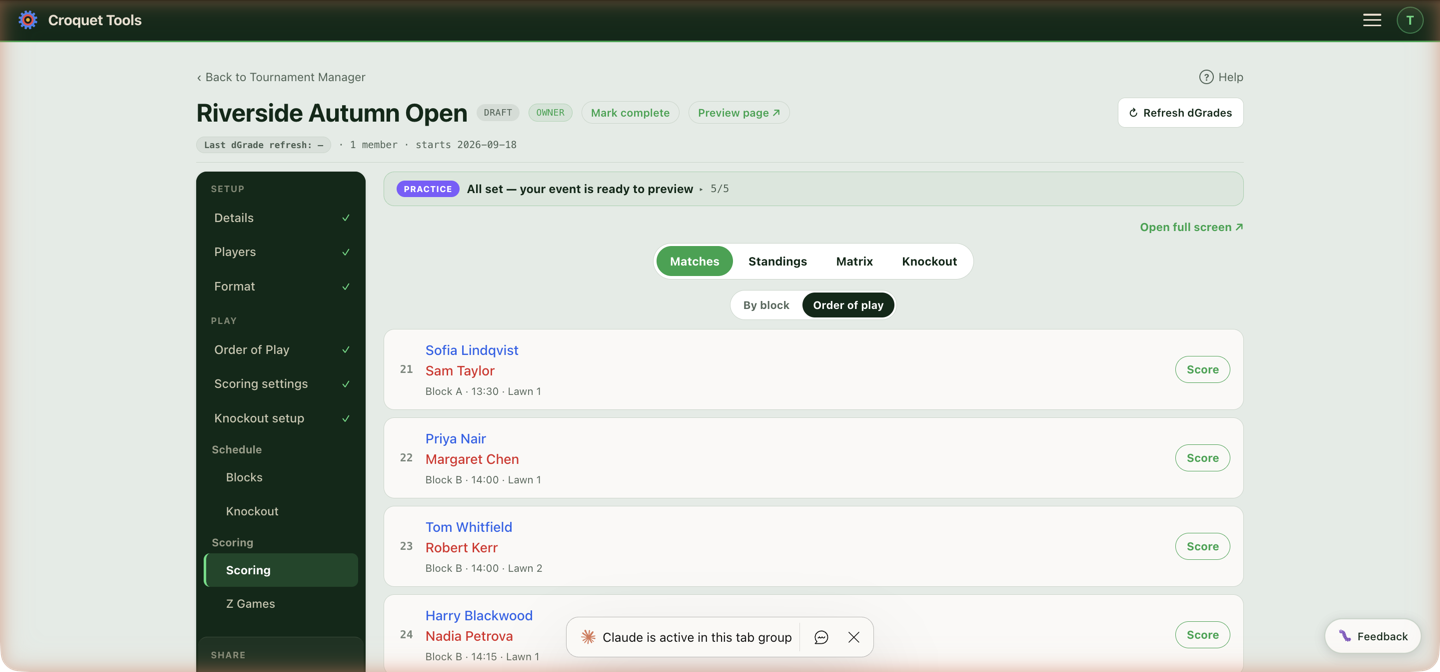
Day-of score entry. It's the one section built phone-first — scorers can work from the lawn — and it's what the scorer role unlocks. Open full screen ↗ gives a clean board for a laptop at the desk; the same scorer also lives at its own URL for sharing with a scorer who needs nothing else.
The views
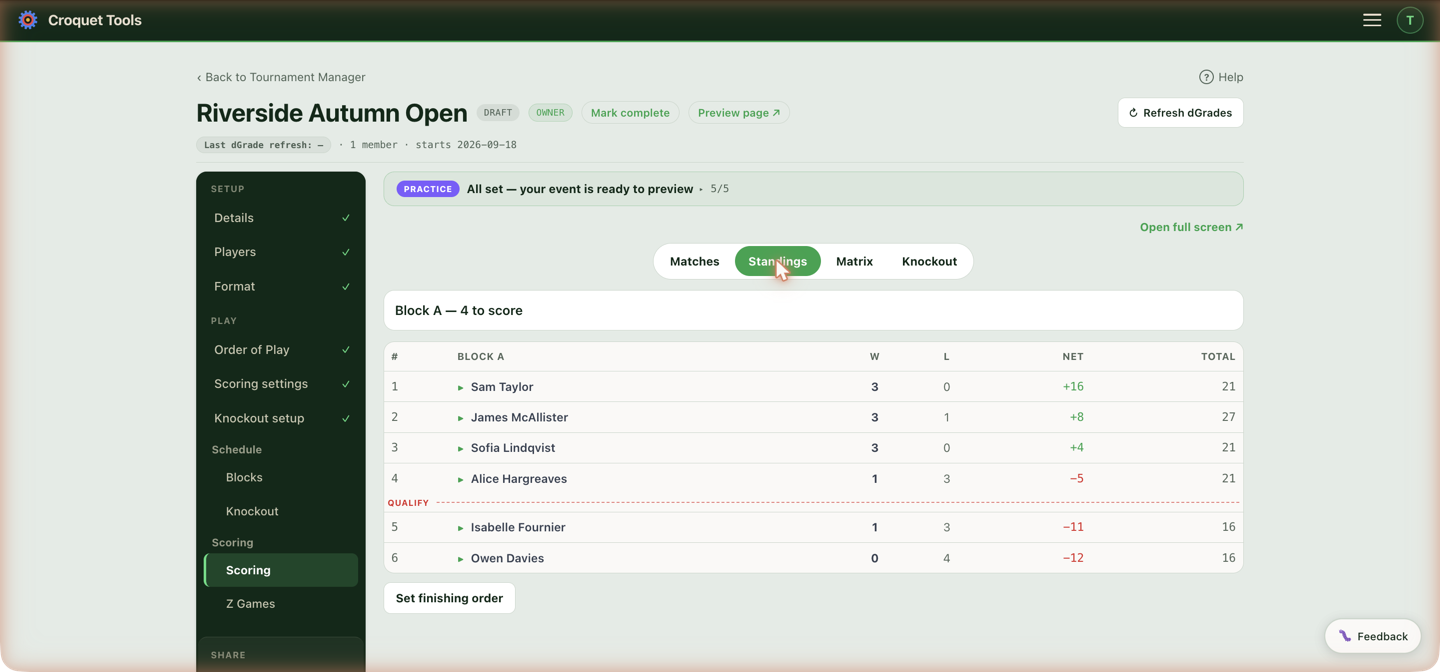
Four segments. The first is named for the stage it scores — Block scoring, Swiss scoring, or Block & Swiss scoring on an event with both, read from the competitions' formats rather than from the games, so it is right before the first result is in — and holds the entry list, in Order of play — every block's games together, by date, time and lawn — or By block, one block at a time. Order of play opens first; a manager who switches to By block stays there on that device. An event with one block shows the block list only. Then Standings (live tables using your tiebreaker chain), Matrix (the block crosstable — a pairing that meets twice shows both results stacked in its cell, the return game marked 2nd meeting in the games list), and Knockout scoring (the brackets, once they exist). On the planner's Scoring tab, Standings and Matrix show every block one under another, each headed with its name, with a Jump to row of block buttons above them that scrolls to the one you pick; ↑ All blocks beside each block's name scrolls back to the row. The full-screen scoring page shows one block at a time, picked from the list at the top. With more than one bracket, Knockout scoring has the same choice: Order of play — every bracket's games together, by date, time and lawn, each row naming its draw and round — or By bracket, one draw at a time. Order of play opens first; a manager who switches to By bracket stays there on that device. In every list the winner of a scored game is in bold green and the other player plain.
A withdrawn player who played stays visible in Standings and Matrix, unranked and struck through. What their played games count for depends on the format. In a block (round robin) it follows WCF Sports Regulations, Appendix 6 §3 — see A withdrawn player's games: games that are ignored are listed with a strikethrough when a row is expanded, and struck the same way in the matrix — on record (and in the WCF export) but counting for no one's standings; games that stand are shown and counted as normal. In a Swiss, where players aren't meant to play everyone, a played result against a since-withdrawn player always stands — nothing is struck except the withdrawn player themself, and win % carries the uneven game counts. Either way their unplayed games leave the Matches list as cancelled — a notice names them, and reinstating the player restores them. The public event page shows the same.
A withdrawn player's games
In a block, whether the games a withdrawn player completed still count for their opponents is set by WCF Sports Regulations, Appendix 6 §3. The tool applies it when the player is withdrawn, and the Withdraw confirmation names the outcome and the clause for each block they are in:
| When they withdrew | Their completed games | Clause |
|---|---|---|
| All their block games had been played | Games stand | §3.2 |
| Games left, but no result still to play could change who qualifies | Games stand | §3.1.1 |
| Games left that could still change who qualifies | Games ignored | §3.1.2 |
Either way the player is unranked: they sit below the table, struck through, and can't take a place or a knockout seed. Stand means their opponents keep the results — wins, losses, games and hoops. Ignored means those results come off everyone's record.
Who qualifies is read from the number going through from each block, set on Knockout setup. Every remaining player must already be certain to finish inside those places, or certain to finish outside them, whatever happens in every game still to play — the withdrawn player's included. A result that could leave a player level on wins at the line counts as open, since a tie there goes to a tiebreak. With no number set, every placing is treated as a line, so games stand under §3.1.1 only when the block's whole finishing order is already fixed. The check is made once, as the block stood when they withdrew; results entered afterwards don't change it.
A worked example — six players, one round left, player W withdraws with one game still to play, against E:
| Player | Wins | Games left |
|---|---|---|
| A | 4 | v B |
| B | 4 | v A |
| C | 1 | — |
| D | 1 | — |
| E | 1 | v W |
- Two go through: E's best is 2 wins, A's and B's worst is 4. No result still to play moves anyone across the line, so W's games stand (§3.1.1) — A and B keep their wins over W, C and D keep their losses to W.
- Three go through: E beating W takes third outright; E losing leaves C, D and E level on 1. W's game against E decides third place, so W's games are ignored (§3.1.2).
Switching it
The withdrawn player's row in Standings shows Games stand or Games ignored, the reason with its clause, and Read the regulation ↗, which opens the WCF Sports Regulations. An owner or manager can switch the decision with Ignore their games or Count their games. The row goes on showing what the rule gave, so a switched decision reads Set by the manager. The rule gives …. Standings, the matrix, knockout seeding, the public event page, the standings board and the display board all follow the decision in force; on the public pages the player's row reads withdrawn · results stand when their games count.
A player withdrawn before this check existed shows Games ignored and can be switched the same way. Reinstating a player clears the decision; withdrawing them again runs the check afresh.
Entering a result
Tap a match, enter the score. Unscored games carry a Score pill (Not scored for read-only viewers) so gaps are easy to spot. In Knockout scoring's Order of play, games still to score come first and scored games drop below a Scored line, as in the block list. In By bracket there is a button per draw — a double elimination's winners, losers and grand final are one draw, one button and one list, as is a Draw & Process — and the rounds with a game still to score come first, unscored games above scored ones within each round, and rounds that are entirely decided drop below a Scored rounds line. A best-of match with games in but no winner yet shows its tally in amber with a Score game n pill — it is still to finish. Beyond the basics:
- Walkover — the two «name» walkover buttons record the result without a played game (walkovers are excluded from the WCF export automatically).
- Has this game ended? — asked under any game whose score is uneven with neither side at the winning total, since the winner advances only once a game is decided. Yes, «name» won ends the game with the score as entered (time, concession); the game then shows ✓ ended, which reopens it. Still in play puts the question away until the score next changes.
- Peg down — for a game whose positions were noted and whose balls came off. The score boxes are the position: type it and the button reads Peg down at «score», or press it with nothing entered to peg without one. The game keeps its place in To score (it may still be finished) with a count of pegged games above the list, and it counts for neither player until a real score is entered. Resume reopens it; Mark not played says it will not be finished. On a Flexible Swiss pool, pegging also returns both players to the queue — see Swiss console.
- Played first at hoop 1 — optional, one tap per game.
- Peels — AC events record a peel code per player; doubles games add a "Peeled by" initials field. A peg-out peel (tp, qp, sxp and the straight forms) ends the game at the full total, so 16tp with both boxes filled is refused: type 16tp on its own in the winner's box for a +16tp win, or both scores (26 and 10).
- Not saved — if a score cannot be written (the connection dropped, or the browser's sign-in lock was held by another tab), the sheet says so in red and keeps what was typed. The result is not on the server until the sheet closes on a successful save.
- Best-of matches take each game in turn; knockout brackets advance winners automatically. In a double-elimination Grand Final, the second final row notes it is played only if the second final is forced — score the Grand Final first.
Mistakes are just re-entered — scores aren't locked. Standings, the matrix, the public page and the display board update as you go.
Advantage Golf Croquet
On an Advantage event the higher score does not win, so this section works a little differently.
The entry sheet opens with a blue Advantage · targets 7 ~ 5 band naming which side plays to which, and each side's stepper stops at that side's own target rather than at a shared total. Where the two targets have a drawn score, the band says which one — if time is called, every score has a winner except 3–2 — before the game starts. A pairing where neither side has a handicap or a dGrade to derive one from is flagged there too, rather than quietly playing level.
The winner comes from the scoring fraction — each side's hoops as a share of its own target — so a game can be won on the lower score, and a played game is listed as both fractions (6/7 · 86% v 5/5 · 100%) rather than a bare scoreline. End game early is offered whenever the fractions can separate the two sides, which includes a level scoreline: 6–6 against targets of 8 and 7 is 75% against 86%.
Standings swap the Net and Total columns for Net SF, and tapping a player opens the working — every game's two fractions, the gap each contributed, and the total. Advantage Golf Croquet explains the figure.
Block play-off
Under WCF placings, when every player in a block has played all their games and players level on match wins sit on both sides of the qualifying line, their rows carry an amber play-off badge and a play-off card appears under the block's standings. The card shows:
- which places are in play and the method from Table 1 of Appendix 6 for that number of players and places (for example 3 players for 1 place: two of them play, the winner plays the third);
- the Most Advantageous Positions (MAPs) where the method has them, ranked on block record under §2.4: beaten all the others in the group, beaten the most of them, net games, net hoops, beaten all still level, then lot. Each player's line says which test placed them;
- the draws and the games, round by round.
The steps:
- Set up the play-off fixes the group and its MAP ranking as they stand. Undo set-up is offered until a draw is made or a game is played.
- Make the draw makes every draw the method needs (a lot for a MAP, who plays whom, groups). The server draws; a draw is made once and never redrawn, and each is shown with the time it was made.
- Each game takes a score and a winner (… won), with Clear result to undo it. Save lawn & time records where and when it is played. Later rounds fill in as winners are known; a game that is only played in some outcomes says so.
- When the card reads Decided, the block's finishing order is saved: the play-off's qualifiers take the places in play, ordered among themselves by net games, net hoops and beaten-all, and the knockout seeds from that order. The save happens the next time the play-off is open to a manager (at once, when a manager entered the last result); Save block placings appears only if a save fails.
To correct a play-off result, press Clear result on that game and enter the right one. A later game whose pairing the correction changes loses its result, since that game was played between different players; it shows as unplayed until its new result is entered. When the play-off is decided again the placings save again. A knockout already seeded keeps its draw until Re-seed existing is pressed on Knockout setup.
Where Table 1 has no method for the number of players and places, the card says so and the order is set with the finishing order editor.
On a test or demo event the card also has 🧪 Play it out with test results: it sets the play-off up, makes every draw and enters a random winner for each game in turn, without scores, until the play-off is decided. The placings then save as they do after a real play-off.
The same card, without the controls, is on the event page under the block's standings, and a Playoff chip for the block (C Playoff) is added to the page's quick links as soon as the block's table calls for a play-off. Before Set up the play-off the public card shows the group, the method and the MAP ranking; the draws and games follow as they are made.
Test data
On a test or demo event, managers see a Test data card (Demo data on a demo event) at the top of this tab. It enters made-up results so the event can be seen part-played or finished without typing scores.
- Score next N fills the next N unscored block and Swiss games in playing order, so every block advances together. Fill all scores every game at once and re-rolls scores already in. On an event with a Burridge Swiss, Fill all fills only the unscored games and never re-rolls, since a Burridge draws its later rounds from earlier results.
- Each Swiss and Burridge Swiss competition has a row: pair and score N rounds, then Go. Each round scores any paired games still open, pairs the next round the way the Swiss console does when everything before it is scored, and scores it. It stops early, and says why, when there is nothing left to pair (every round played, no round slots yet, or a Burridge whose opening rounds have not been drawn).
- Clear test data (Clear demo players) removes the generated players and their scores.
A Flexible Swiss pairs as lawns free up, so only games already paired are filled. Knockouts are filled where they are scored, below.
Under WCF placings, Score next and Fill all also play out the play-off of any block that finishes level across the qualifying line, and save its placings. A block already finished and waiting on a play-off is listed on the card under Block play-offs, with Play it out (one block) or Play them out (several).
Test results in the knockout
The Knockout view starts with a 🧪 Test results bar:
- Score next round enters a made-up result for every bracket game whose two players are both known and that has no result yet.
- Fill all knockout games does the same again and again as winners move on, until every bracket is finished.
Results follow each match's best-of and game length. A game still waiting for players is left alone and counted in the message; a first round fills in once the block finishing order is set. A grand-final reset (if necessary) is not filled. The bar is not shown on an Advantage event, whose games need each pairing's targets.
A tied block's play-off card also has 🧪 Play it out with test results, for one block at a time; see Block play-off.
Finishing order
When a block ends in a tie the tiebreakers don't break — a coin flip, a playoff — set the block's finishing order by hand: reorder with the arrows, mark joint places with =, Save finishing order. An order that contradicts a played result asks you to type change the order before it saves. The block then stops following its scores (and the public standings say the order was set by the manager, if you've enabled the tiebreaker explanation). This matters most when a knockout seeds from the block — the same editor appears on Knockout setup.
Z games
Ad-hoc games between two event players outside the draw — a friendly while waiting, a challenge game. Pick the two players, enter the score, Add game. On an AC event the score goes through the same sheet as every other AC result — Score… opens it — so a peel (tp, qp), a margin (+23tp) or a full score (26tp-3) and the time-limit marker are all recorded and reach the WCF export; each game has Edit to change a score in place. A Z game started from the Swiss console is listed here as in play with its lawn and start time until it has a result: on a GC event two boxes and Save score it from this list, on an AC event Score… opens the sheet. Z games sit apart from the competition (no standings effect) but they count for the WCF — exported under a "Z" section — and appear on the event page.
Related
- Scoring settings — the rules these scores are ranked under.
- Advantage Golf Croquet — target scores, scoring fractions and net SF.
- Getting started — inviting a scorer.