What this section does
Format is where each competition gets its shape: how the field plays (blocks, Swiss, knockout…), how it's split and seeded, how long a match is, and what happens after the first stage. If the event has several competitions, the Competition band at the top shows which one the tab is set to and holds a pill for each; every competition has its own format, so pick the pill to see and set it. All format settings → on the Swiss console opens this tab on the Swiss competition. A competition whose format is Knockout has nothing further to set here, and its card carries a Knockout setup → link to the draw.
The tool walks you through these as plain questions the first time; everything below is what each answer does.
Progressive Swiss is the last option in How will they play? below, and opens its walk-through in place. It asks for a main knockout, a consolation Swiss fed by it and a knockout off that Swiss in one pass, then builds all three and the handovers between them — writing the same things this section and Pathway write, so everything it makes is edited here afterwards. See Progressive Swiss. Any other shape is built section by section as below.
Competitions
A competition is one field of players. Blocks, Swiss pools and knockouts are formats — the stages that field plays through, not competitions themselves.
A new competition starts wherever a new field starts:
- Split before play — a Championship and a First Flight divided by rating, or a singles draw and a doubles draw. The two fields never meet.
- Formed after play — players moving on to something new: a plate for those knocked out of the main draw, or for those who don't qualify from a Burridge Swiss. The plate is its own competition, joined to the one it takes players from by a handover on Pathway.
Stages the same players play through stay inside one competition: blocks into their knockout, a Burridge Swiss into its knockout.
| The event | Competitions |
|---|---|
| Two blocks of 6, top four from each into a knockout | 1 |
| Burridge Swiss → knockout | 1 |
| Burridge Swiss → knockout, plus a plate for the rest | 2 — Championship, Plate |
| A knockout, a Swiss for its losers, and a knockout off that Swiss | 3 — the event page shows the last two under one Plate title |
| Championship and First Flight, split by rating | 2 |
| A singles draw and a doubles draw | 2 |
| First 8, Second 8, Third 8, Fourth 8 | 4 |
Understanding competitions and formats at the top of this section draws the same thing: one competition with its stages inside it, beside two side by side. It sits closed as a full-width box — red-bordered until you have opened it once — and expands on a click; close it and it folds back to the box.
Add one with a name and a type (Singles / Doubles), reorder them with ↑↓ (auto-assign fills competitions in this order, so keep the top competition first), and delete with ✕. Player chips show who's assigned.
Deleting a competition doesn't delete its players. A singles competition returns them to Unassigned, ready to place somewhere else; a player who is also in another competition just leaves this one, so nobody ends up listed twice. The same goes for the × beside a name, which takes that player out of the competition. A doubles competition hands its entrants to the other doubles competition when there is exactly one; when there isn't, its pairs become unassigned and anyone still waiting for a partner leaves the doubles field entirely and has to be added again — the confirmation says which of these is about to happen.
A Swiss competition that a handover feeds carries a chip saying which kind of consolation it is. Progressive · Championship results count means the source competition's results count towards these standings, so players arrive with their record — a Progressive Swiss. Own games only means the standings rank this competition's games alone and the source's results stay where they were played. The two are the same format with the same players arriving the same way; the chip is the only visible difference.
While everyone is unassigned, the Who plays in which competition proposal splits the field by rating; once some are placed, an Edit competition sizes card with Edit / Auto-assign handles the rest — see Who plays in which competition.
Per-competition scheduling overrides (e.g. doubles blocks on the weekend, singles midweek) are set on the Schedule section — see Schedule adjustments.
How will they play?
Five formats:
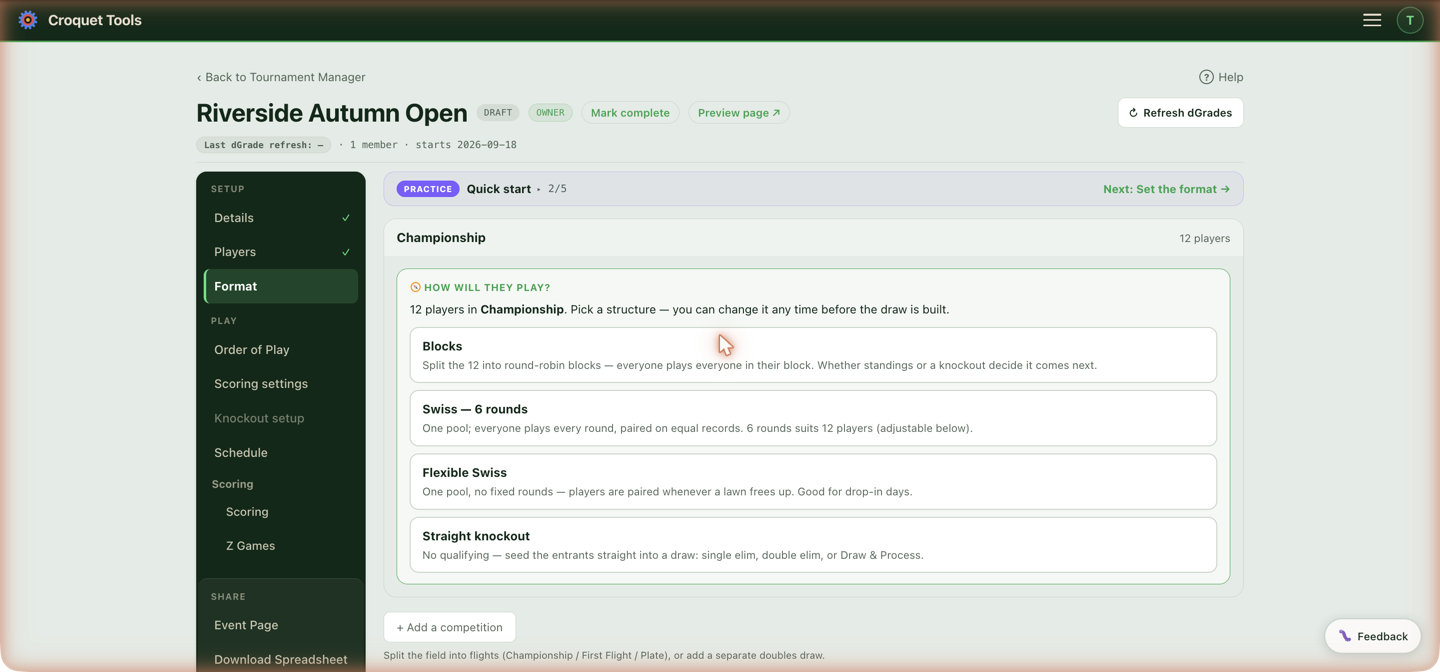
| Format | What it is |
|---|---|
| Blocks | Round-robin blocks — everyone in a block plays everyone once. Standings or a knockout decide what follows. |
| Swiss — N rounds | One pool, a fixed number of rounds; each round pairs players with similar records. |
| Flexible Swiss | One pool, no fixed rounds — players are paired whenever a lawn frees up. Runs from a live console on the day. |
| Knockout | No first stage — single elimination, double elimination, or Draw & Process, configured in Knockout setup. |
| Burridge Swiss | Swiss qualifying that feeds a knockout, per Croquet England regulation F8, with an optional plate for the players who don't qualify. The option appears only when it's enabled for your account. |
Choosing a format sets out the mechanics that differ between them — games per player, elimination, lawn time.
Add the plate
Shown once Burridge Swiss is chosen. The qualifiers are drawn into this competition's knockout in Knockout setup once the Burridge is complete. Add the plate creates a second competition for everyone else, set as a knockout, and writes its two handovers on Pathway:
- Everyone who doesn't qualify — into both halves of a Draw & Process.
- Losers of rounds 1–2 of this competition's knockout — one held seat each, dealt alternately between the Draw and the Process down the bracket.
The name box starts as "Plate". Once added, the card names the plate and the knockout rounds that feed it; the plate itself is drawn later, under Plate off a Burridge Swiss.
Split the field
For blocks, pick how many blocks from the split pills. The ★ marks the tool's starting point — the split whose block sizes come closest to 7 — and the line beneath gives the games per player each split produces, since a block of s plays s−1 games. For 16 players that is 7 games each in 2 blocks of 8, or 3 games each in 4 blocks of 4. Bigger blocks mean more games per player and more lawn time to fit them.
Set up blocks myself opens the full block builder instead.
Seed blocks by
Current dGrade seeds on each player's grade right now; Max dGrade last 12 months seeds on their highest grade in the last 12 months; Handicap seeds on the handicap shown on the roster, lowest first, and is the starting choice in an Advantage Golf Croquet competition. Changing the source after blocks are seeded re-orders the ranked list, so it flags the blocks as stale. Blocks seeded on the max show that figure beside each name (2287 max), recorded at the moment of seeding, with the current dGrade on hover; a player with no games in the last 12 months is seeded on their current dGrade and shows 1262 · no games in 12 mo. The roster and the event page's Players tab lead with the max too. While a draw rule is on, the source is always the highest grade in the last 12 months.
How long is a match?
Single game / Best of 3 / Best of 5, and the game length — First to 7 · 13 point game, First to 10 · 19 point game or First to 4 · 7 point game in GC; 26, 22, 18 or 14 points in AC. This applies to every block in the competition (per-round knockout formats are set separately in Knockout setup). Match length drives how much lawn time the schedule reserves, so set it before generating a schedule.
Each pair meets
Once (a single round robin) or Twice — every pairing in the block is played a second time, as a separate match that counts on its own. This is not a best-of: a best-of stops as soon as one side has won enough games and is one result; twice is two results, and a 1–1 split stands. A block of 5 that meets twice is 8 games per player in 10 rounds; a block of 8 is 14 games in 14 rounds. The two settings are independent — twice, best of 3 is two best-of-3 matches per pairing.
Play the two games — At different times puts the return games in a second set of rounds (rounds 6 to 10 of a five-block), which the schedule places like any other match. Back to back puts the return game in the same round as the first, played straight after it on the same lawn: one sitting, two results. The scheduler sizes that sitting for two games and writes both times; the order of play lists each round's pairings once, marked × 2.
The round order is the same in both legs, so under WCF Regs the qualification-cusp match closes each leg, and in an odd-sized block each player's bye falls in the same round of each leg. Changing either answer after pairings exist marks the order of play stale; Regenerate rebuilds it.
A straight knockout is asked the same question, and the answer prefills every round of its draw — Knockout setup can still lengthen the final, or any round, on its own. Without it a knockout-only competition has no qualifying stage to inherit a format from, so the wizard would open on the bare discipline default whatever the event actually plays. The figure also sizes the knockout schedule: each round's length is the game length times the games the format can run to.
How does the Swiss run?
A Swiss or Flexible Swiss pool has pacing settings that all carry defaults, which is why they get missed — nothing looks unanswered. They live in one place: the settings panel for the competition, on this tab, described below.
Swiss has only Rounds, with the suggestion for the field size beside it.
Flexible Swiss has the three the live board obeys:
- Pair when waiting ≥ — the board proposes nothing until that many players are free. Pairing as soon as four are waiting tends to put the strongest against the weakest.
- Minimum games — how many a player must complete to be eligible to win. 0 means one win from one game reads as 100%.
- Double-banking — whether two games share a lawn. Off, ten lawns run ten games; allowed, twenty. The board halves or doubles its capacity on this one answer.
- Board name — what the public page's Scores tab calls this competition's board view (on court, waiting, most recent games). Blank uses Swiss.
They save as you change them, and the same settings are on the Swiss console, so they can be changed at any point including while the event is running.
Minimum games decides who may win this competition and nothing else. A merit cut that runs off it — a Progressive Swiss plate knockout, say — has its own separate floor on the handover, which starts at none.
Seed order
A Swiss pairs on record, and the Seed order on the One pool card is what stands in where records are level: two players on the same percentage are ranked by it, and at the very start, when nobody has played, it is all there is. For a Swiss it decides round 1 outright (1 v 2, 3 v 4…); for a Flexible Swiss it rarely matters once results are in. Order added keeps the sequence the players were entered in, and is where a pool starts. Current dGrade, Max 12-mo and, in an Advantage Golf Croquet competition, Handicap rank the pool on that basis instead; Re-seed re-ranks on the basis showing after ratings change. Pressing Order added after a basis clears the seeds again. A Burridge Swiss draws its opening rounds on grade balance, so seeding there only sorts the list.
Then what?
Every structure is asked this, and what it asks depends on the structure. Blocks and Swiss pools are asked what the standings feed; a straight knockout is asked what a beaten player does next. Where a merit cut already leaves the competition — the plate of a Progressive Swiss, whose top few on record go through to its knockout — the question is not asked: the card shows the answer, A knockout follows the pool: the top n on record go through to ⟨name⟩, with a link to Pathway to change it.
For blocks and pools: Block standings decide (the block result is the final result) or A knockout (block finishers progress to brackets — the tool takes you on to Knockout setup).
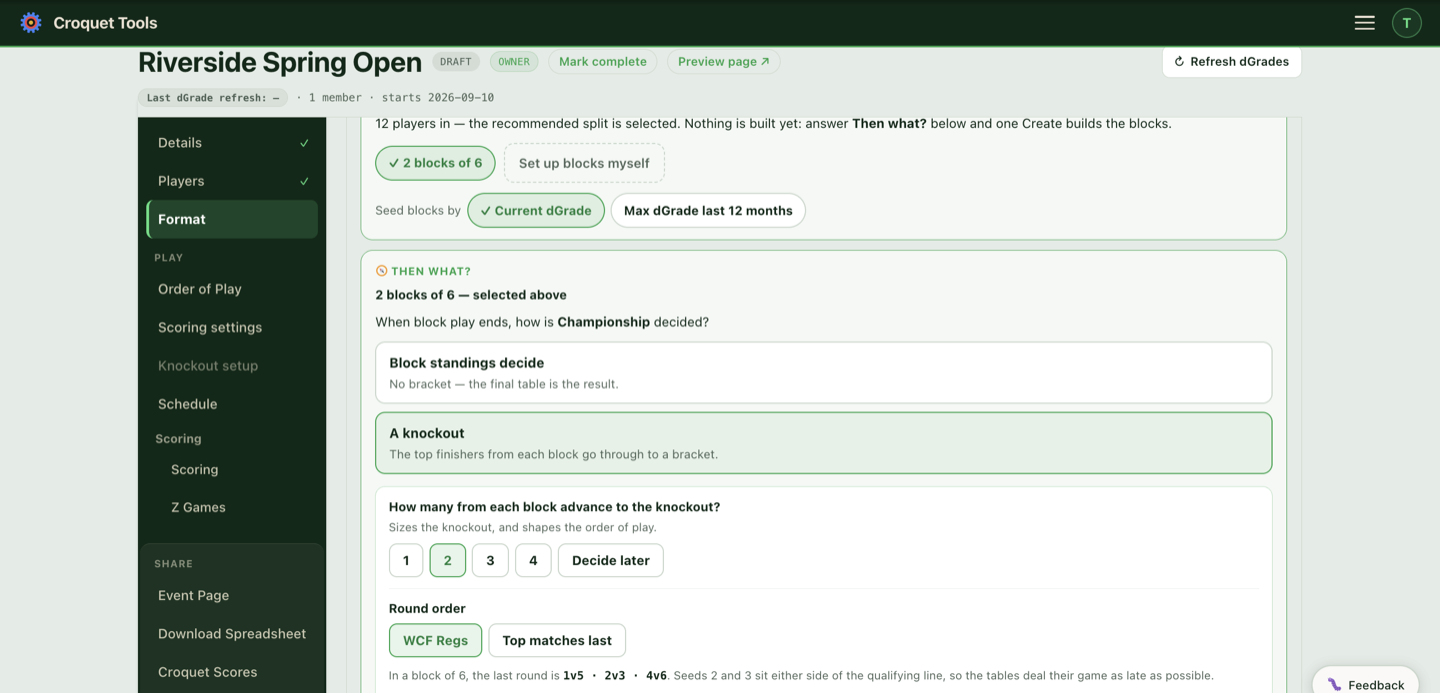
For a blocks competition, either answer then shows the Round order the draw will use, because that is decided here rather than downstream.
Block standings decide sets it to Top matches last, so the block builds to its top-of-table games and finishes on 1v2, 3v4, 5v6. There is no qualifying line in a standings-decided block, so the WCF tables' late 4v5 — the game that would settle the last place through — settles nothing. Switch back to WCF Regs on the same card if you want the published order regardless.
Answering A knockout sets it to WCF Regs and asks one more question:
How many from each block advance to the knockout?
1, 2, 3, 4, All, or Decide later. It sizes the knockout, sets the qualifying line in the standings, and — on the WCF Regs round order — decides which games are dealt into the closing rounds. The published WCF tables assume four go through, so they close a block of six on 1v3 · 2v6 · 4v5. Answer 2 and the same table is dealt with the seeds renumbered, so the game across the line lands last: the block of six then closes on 1v5 · 2v3 · 4v6, with seeds 2 and 3 — the pair either side of the line — meeting in the final round. The line under the pills shows the last round your answer produces.
This one has to be answered before you can save — it goes amber until it is, because the order of play is generated from it and an unanswered question would quietly build the wrong one. Decide later is a real answer and clears it in one click.
All sends every player in each block through, so there is no qualifying line: the block results only seed the knockout, and the published tables are used unchanged.
Decide later leaves the number unset: the published tables are used, and Knockout setup asks the question when you build the bracket.
Knockout setup asks it too, prefilled from your answer here, and it is the only place that takes a different count per block (5·5·6 for a draw of 16).
Round order
The same choice as on Order of play — WCF Regs or Top matches last — offered here because at this point nothing has been generated, so choosing costs nothing. Each answer to Then what? preselects the order that suits it, and the line beneath shows the last round it produces. Choosing an order yourself stops the preselection for the rest of the card.
Once the order of play exists, this shows what the competition is using and sends you to Order of play to change it, where the rebuild keeps every scheduled time.
On Top matches last the qualifier count doesn't affect the order of play at all; that order always closes on 1v2, 3v4, 5v6.
Swiss and Flexible Swiss competitions aren't asked either question — their pairings are drawn per round, so neither applies.
A consolation event alongside
A straight knockout's whole field is in the draw, so the question it gets is what a beaten player plays: Nothing — the knockout is the event, or A consolation event alongside.
Nothing is the one-draw answer. Losers can still keep playing within the draw — a 3rd-place playoff or full placement is the Do round losers keep playing? question in Knockout setup, not this one.
A consolation event alongside builds a second competition next to the knockout — its own pool and its own winner. Whether the knockout's results count towards its standings is one of the questions, not a fixed property. This card asks three things:
- How is the consolation played? — Flexible Swiss pairs whoever is waiting as lawns free up, so a player knocked out mid-morning gets a game without waiting for a round to end. Swiss runs fixed rounds, and everyone in it plays the same number of games.
- Who is in it? — Everyone, from the start puts the whole field in the pool resting: nobody is paired until you mark them Ready on the Swiss console, so a player still in the knockout and waiting on an opponent can take a consolation game meanwhile. Add them as they lose starts the pool empty; add players to it from the Players tab as they go out.
- Do the knockout's results count in its standings? (the heading names your competition) — Yes means a player arrives with their knockout record — the games they lost as well as the ones they won — and the standings rank them on the combined percentage. A player beaten in the first round enters on 0–1; a beaten semi-finalist enters on the record that took them that far. The consolation is then decided on the whole event: a Progressive Swiss (Reg F4). No means everyone starts level in the consolation and how far they got in the knockout counts for nothing in it — a first-round loser and a beaten semi-finalist begin equal. That is a plain plate.
The two can produce different winners off exactly the same games, so neither answer is pre-selected and Create waits until one is chosen.
Called names it — Consolation unless the event already has one.
Nothing is built until Create is pressed, and the answer isn't stored before then. Leaving the Format tab with a consolation chosen but not created discards it — the tab's forward button warns first, and names the competition whose card is unfinished.
The two competitions run side by side and a player can be in both at once, whichever way the standings question was answered.
Where the pair already exists without that question having been put — the consolation was made first, or the handover was drawn on Pathway — the knockout's own card asks it there instead, under One thing to settle. Answering either way settles it and the card does not return.
Set by the template
An event created from a template shows a green card on its competition in place of the usual Format questions, headed Set by the … template. It lists what the template set in a few lines, then the steps still to do:
- Add players — the count so far, and the minimum the blocks need (three per block). Players → opens the Players tab.
- Draw the blocks — splits the field into the template's blocks, applies its draw rules, and generates each block's order of play. Once drawn, the step shows How the blocks were drawn: each exchange the draw rules made to spread countries, each last-round move, and any seats changed by hand afterwards, the same record the event page shows under the Players tab. Once drawn, Draw again replaces the blocks and their order of play, and rebuilds the knockout if one was built. The button is gone once a block result is recorded.
- Build the knockout — builds the knockout from the top of each block, with the template's seeding and match lengths. Its lines show seed labels until the blocks finish; Knockouts → opens the Knockouts tab, where Refresh dGrades and Re-seed existing make the draw once block play is over.
- The Plate — opens after the knockout is built and every block has finished. See Set up the Plate.
Change format settings
Change format settings under the card opens the full Format tab for the competition, and Hide the format settings folds it away again. Anything changed there that differs from the template is listed on the card as Changed from the template, for example a different number of blocks, a different match length or a changed tiebreak order. Changing the format away from blocks (to a Swiss, say) hides the steps, and the competition is then set up like any other.
The Scoring tab is not folded by a template; its settings show as normal.
The block builder
Once blocks exist you can go beyond the even split:
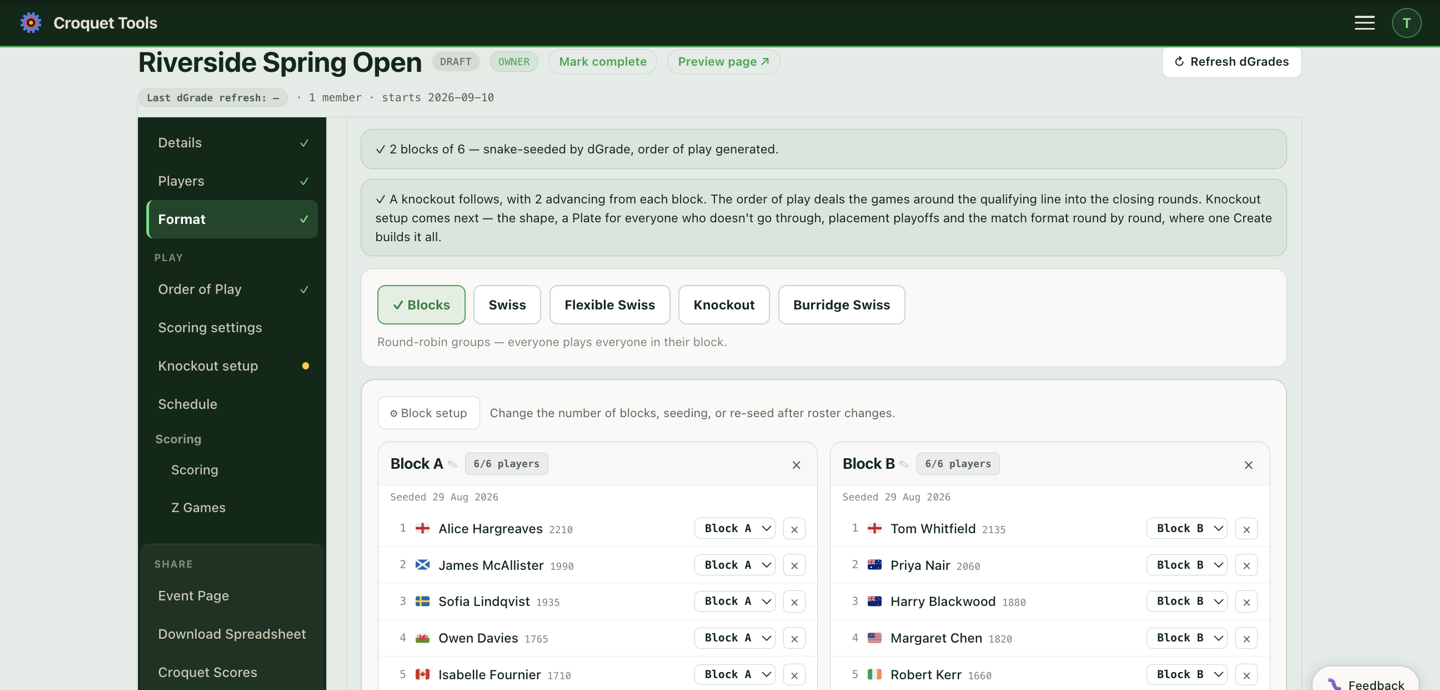
- A Blocks count with an auto-even split preview ("Auto-even split: 6 / 6 / 5"), Create blocks / Reconfigure (replaces all blocks and clears assignments; a knockout already seeded from them has to be rebuilt, see When the blocks are rebuilt after the knockout), + Add block.
- ↻ Snake-seed all — deals seeds down the blocks in a snake (1st seed to Block A, 2nd to B, 3rd to B, 4th to A, …) so blocks come out balanced. The tool's How blocks are seeded fold shows the exact pattern.
- Move any player between blocks with the per-player dropdown, or remove them from a block. A moved player goes into the new block's list by the competition's seeding (dGrade, max dGrade, or handicap then tracking points): above the first player there they outrank, with the others keeping their order, and the block's seeds are renumbered. A player with no rating goes to the bottom.
- Exchange seats: the seed number beside each player is also a dropdown listing every seat in every block ("C4 · name"). Picking a seat exchanges the two players' blocks and seed numbers. This is how a draw made by hand is entered; see A draw made by hand.
- Placed blocks — build a competition from another competition's finishing positions (e.g. a Plate for third-and-below).
- Custom blocks — hand-built blocks with their own name, match format and public notes.
"Snake-seed may be stale" appears when a dGrade refresh changed ratings after blocks were seeded, or, in a competition seeded on the max, when a grade sync moved a player's max dGrade (12 mo); a roster change marks the affected blocks with a Snake order stale pill instead. Review changes shows what moved; Re-snake affected blocks re-deals them. Ignore it deliberately, not accidentally: a stale seed means the blocks no longer reflect the field.
When formats lock
Once a competition has recorded results, its format locks ("Format locked — results recorded"). Reshaping it means clearing the scores first — which deletes the recorded results, so the lock exists to make that a deliberate step.
Related
- Players — the roster and competition assignment.
- Progressive Swiss — the one-pass build for a main knockout, a consolation Swiss and its knockout.
- FAQ — what the rail badges and dimmed sections mean.