What this section does
The rules each competition is scored under: match format, how standings break ties, where the qualifying line sits, and — once brackets exist — best-of and game points round by round. Scores themselves are entered on the Scoring section.
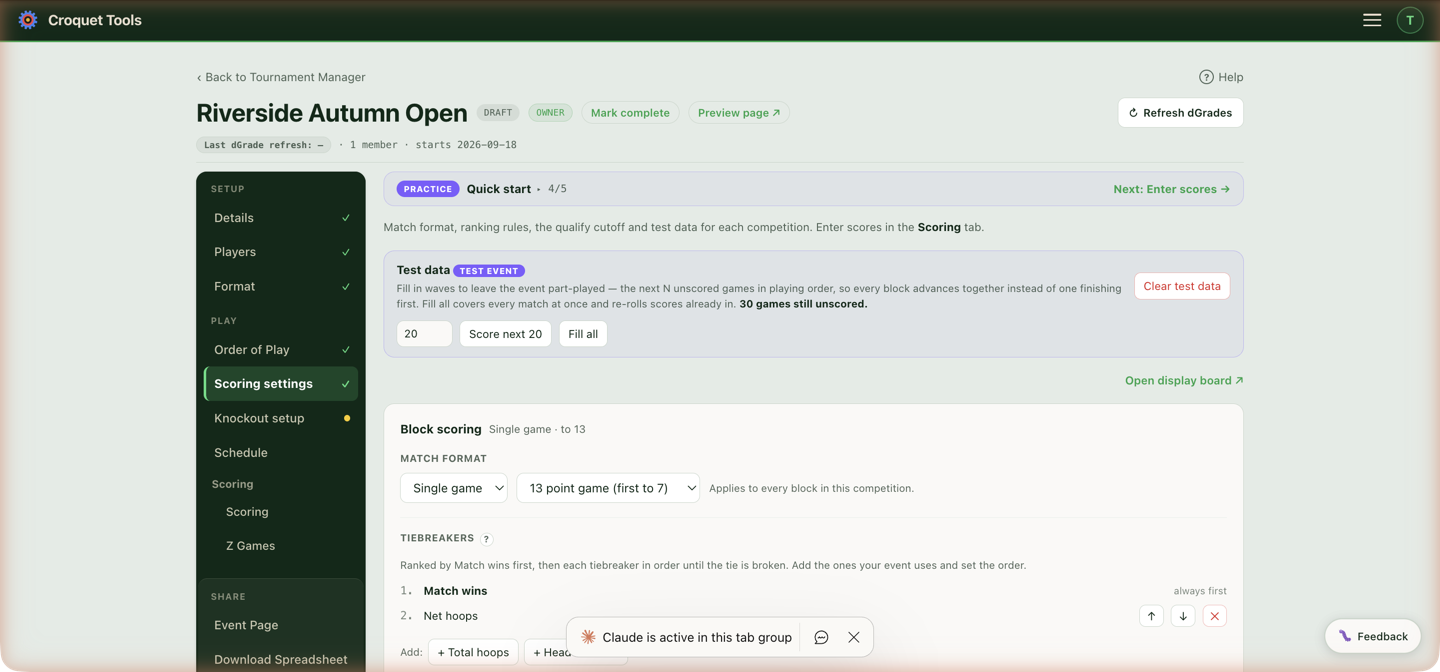
With more than one competition, pick which at the top; each has its own settings.
Settings
Match format
Single game / Best 2 of 3 / Best 3 of 5, and the game length — First to 7 · 13 point game, First to 10 · 19 point game or First to 4 · 7 point game in GC; 26, 22, 18 or 14 points in AC. Applies to every block in the competition. This is the same setting as on Format — it lives in both places because it's both a draw decision and a scoring rule.
On an Advantage event this setting picks which published target table the competition reads: first to 7 is the Standard table, first to 10 the Long, first to 4 the Short. No length is set per game there — each side plays to its own target. A competition on any other length has no table, so it keeps level play even inside an Advantage event.
Each pair meets — Once or Twice — and, for twice, Play the two games At different times or Back to back: the same setting as Format ▸ Each pair meets. Round-robin blocks only. Both meetings count as separate matches in the standings; the Matrix shows them stacked in one cell.
Tiebreakers
Standings rank by Match wins first. A Swiss ranks by Win percentage instead, and the card is headed Swiss scoring and shows that as row 1, since players' game counts can differ mid-event. Below that you build the chain your event actually uses: add tiebreakers (net hoops, total hoops, head-to-head; with best-of matches, game-based breakers join the list), reorder them with ↑↓, remove with ✕. With head-to-head in the chain, a 3+ way ties checkbox also compares net hoops within the tied group. Each breaker is applied in order until the tie is broken. Apply these to all competitions copies the chain across the event.
On a Swiss or Flexible Swiss competition the picker also offers Quality of opponents — the final win percentage of every opponent a player faced, added up, one term per game. A round robin is not offered it: everyone there faces the same field. See Quality of opponents.
Where a merit cut runs off this competition — the top few on record going through to a knockout — a note under the chain says so. That cut is not ordered by this chain: it is the qualifying table, ranked on percentage of games won, and its two tie settings (How a qualifying tie is resolved and How a seeding tie is split) live on Pathway ▸ Edit. The note prints the settings currently in force and links straight to them.
On an Advantage event the picker offers Net SF and Net SF per game in place of net and total hoops, which are withdrawn entirely: they would compare scores made against different targets. A round-robin competition starts on Net SF, a Swiss on Net SF per game, and head-to-head — including the 3+ way comparison — is settled on net SF too. A note above the chain says so.
#### WCF placings (Appendix 6)
Shown to accounts with the WCF Championship permission, on a Golf Croquet round-robin competition (not Advantage, not Swiss). A site admin managing someone else's event sees it only when that event's owner has the permission. Use WCF placings (Appendix 6) replaces the chain with the WCF Sports Regulations v9.6, Appendix 6:
- Players level on match wins among the qualifiers (§1.3) are placed by net games, then net hoops, then the player who has beaten all the others still level, then by lot. No play-off is played for these places.
- Players level on match wins across the qualifying line of a finished block form a Resolution Group and play single sudden-death games (§2). No tiebreaker is applied to them; see Block play-off.
While it is on, the chain is shown as a locked panel. Switch off WCF placings returns the competition to the default chain. Players still level after every step are shown level, for the manager to settle by lot with the finishing order editor. The play-off needs a Qualifying line to know where the line is.
Explain the tiebreakers on the public standings
A checkbox that prints the rules in force under each public standings table — and, when a tiebreaker actually decided a place, which places and which tiebreaker. Where you've set a finishing order by hand it says so instead, rather than crediting a tiebreaker for your decision. The live preview shows exactly what visitors will read.
Your own wording (optional) replaces the generated line — use it when your real tiebreaker is something the app doesn't model: a play-off, a countback, fewest games lost.
Qualifying line
Optional. The cutoff position comes from Knockout setup — answering How many from each block go through? there sets the line here. You choose whether to show the line in the standings and what to call it (default "Playoff cutoff"). The in-tool ? shows a visual of how it renders.
A Burridge Swiss is the exception: its line (labelled "Qualifying line") is drawn from each player's qualification status — under the last player who has reached the Wins to qualify — not from a stored position. It appears on the Swiss console standings, the event page's Scores tab, the standings board and the display board, and needs no setting here.
The table itself ranks a Burridge Swiss as a Swiss — win percentage, then the tiebreaks set here — except that every player who has reached the Wins to qualify ranks above everyone who has not. Before anyone qualifies it is an ordinary Swiss table; once they do, the qualifiers stay together above the line. Among them, win percentage is the same as fewest losses, since they all have the same number of wins.
Knockout scoring
Once brackets exist, set best-of and game points per round — Final, Semifinal, Quarterfinal, and so on — so a final can run best-of-3 above single-game earlier rounds. Changes apply in place: every match keeps its date, court and any scores already entered.
Related
- Knockout setup — where the qualifying number is decided.
- Advantage Golf Croquet — what net SF measures and how it is worked out.
- Scoring — entering results on the day.