What this section does
Builds a full-screen board for a clubhouse TV: live standings, upcoming games, brackets, announcements. Open the board's link on the TV and leave it — it refreshes itself as scores land.
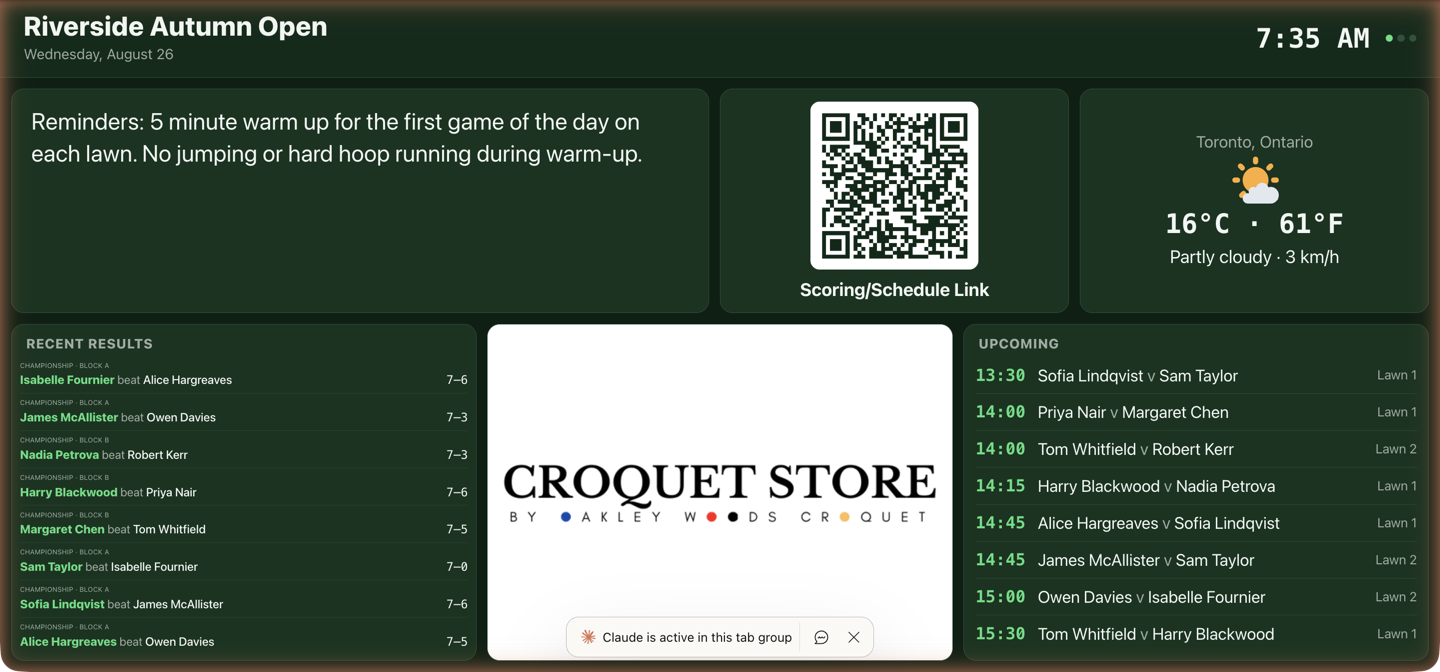
Getting it on the TV
- Open board ↗ / Copy TV link — the selected board's direct URL.
- Get a short TV code — a 6-character code to type at
croquettools.com/tvon the TV instead of the long link — six characters instead of a full URL on a TV remote.
The board is built for TV and desktop screens. On a phone it shows a pointer to a bigger screen instead, with a link to the event page — the phone surface for scores.
Keeping the screen on
While the board is open, the page asks the browser to keep the screen on, and plays a tiny silent video in the corner of the screen as a second signal. On most computers and TV browsers this stops the screen dimming and the screensaver starting.
A web page cannot change the TV's own power settings. A TV with a screensaver timer, a sleep timer, or an energy-saving "turn off after a few hours without the remote" setting still follows it. On a Fire TV, the screensaver start time is under Settings › Display & Sounds › Screensaver; the sleep timer and any auto power-off setting are in the TV's settings, under names that vary by make.
Boards
An event can hold more than one board, so two screens need not show the same thing: standings on the clubhouse TV, order of play on the screen by the lawns. The Boards row across the top selects which one you are editing — everything below it, from the theme down to the pages, belongs to the selected board.
+ Add board… offers a copy of this board (same layout, new name, edit from there), a basic layout, or a blank one. Beside the name are Open board ↗, Copy TV link, the ← → arrows that reorder boards, and Delete board.
Each board gets its own TV code, so each screen loads its own board from the same six characters it always used. The first board is the one a plain /display/<event> link opens; the others carry a ?board= on the end, which the Copy TV link button gives you. Reordering matters for that reason: move a board to the front and it becomes what the plain link opens. Deleting a board releases its TV code.
One board is the normal case — an event with a single board looks and works exactly as it did.
The layout model
A board is pages → sections → columns → widgets. Pages rotate on a timer; each page is stacked sections (rows); each section splits into columns; each column stacks widgets. A section with one column spans full width — + Column puts widgets side by side (the QR code beside your notice), and the weight numbers size rows and columns (a 2 gets twice the space of a 1).
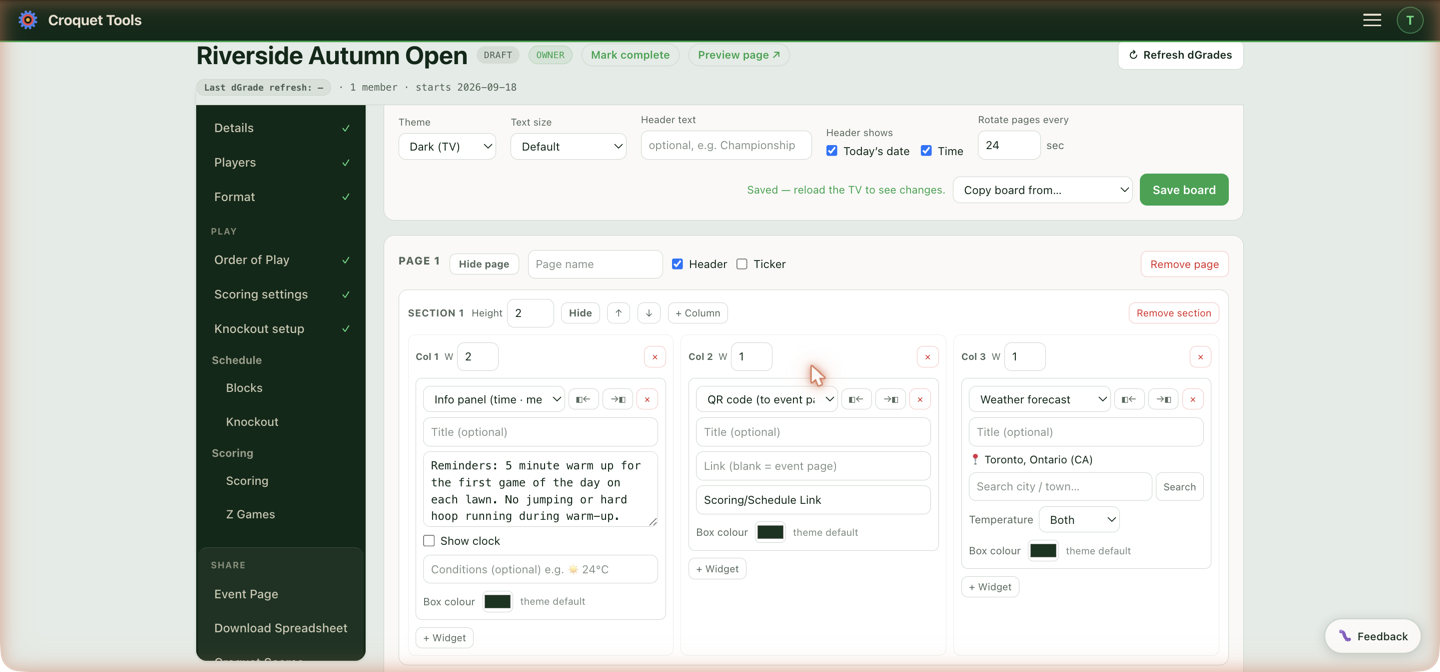
Every change saves as you make it — the editor shows ✓ Saved with the time, and the TV picks the change up within a minute. There is no Save button.
First time in, the starts are: Start from the example board (a finished board copied from a real championship, widgets reset to this event's data), Start with a basic layout, and — once another of your events has a board — Copy board from my event… to reuse it. Copying from your own event at this point brings across every board that event has; the Copy board from… picker later on replaces the one board you are looking at.
Board settings
These belong to the selected board, so a second screen can run a different theme or rotation. Theme (Dark for TVs, Light sage), Text size, Header text plus separate checkboxes for today's date and a clock, and Rotate pages every N sec. Per page: a name, a visibility pill — green ● Visible — hide when the page is in the rotation, amber ● Hidden — show when it is skipped (build page 2 without showing it) — an optional header row, and an optional ticker — a scrolling strip of recent results for a chosen competition.
Once the board is rotating, each page also gets Show for … sec: how long that page alone holds the screen. Leave it blank and the page takes the board's figure, which the box shows in grey — so a page of eight blocks can sit for a minute while the QR code passes in fifteen seconds. It is only an override; a figure typed here does not start a rotation on a board that isn't rotating.
Duplicate
Duplicate on a page's row adds a copy of that page straight after it: its sections, columns, widgets, header, ticker and Show for time. The copy is named after the original with "(copy)" on the end and starts hidden, so it stays off the TV until you click ● Hidden — show.
Preview
Preview on a page's row opens that page on its own in a new browser tab, with no rotation, so you can check it without waiting for the board to cycle round to it. A hidden page previews too. The preview follows your edits as you make them, before they save, as long as the editor is open in the same browser; an orange Preview tag in the corner names the page. Clicking Preview on another page switches the same tab to that page. The TV and anyone else watching the board see no change.
Widgets
| Widget | Shows |
|---|---|
| Announcement | Formatted text — markdown supported |
| Info panel | Time · message · conditions |
| Standings | A block or competition table, live |
| Cross block | A cross-block pair, each block ranked against the other with every score |
| Upcoming games | What's next, in order |
| Recent results | Latest scores |
| On court now / next | Every game on each lawn right now |
| Event progress | How far through the event is |
| Knockout bracket | The draw as it fills |
| Swiss — on court & waiting | The live Swiss board, including any games pegged down |
| Clock / Countdown | Time, or a countdown to a set time |
| Sponsor / photo rotator | Rotating images |
| QR code | Straight to the event page |
| Weather forecast / Rain radar | Local conditions, live map |
| Blank / spacer | Layout control |
Swiss — on court & waiting is offered only when a competition in the event plays Swiss.
Standings always show Wins; tick boxes add Losses (W–L) (on for a new Standings widget), Net hoops (on) and Total hoops (off). Standings show a flag beside each name — both flags when a doubles pair is split across two countries. Each widget can take a box colour, and the ▸ Formatting help fold covers text styling.
Every data widget scopes by competition with tick boxes: tick none for all of them, or tick the two you mean out of four — so one Event progress panel can count both doubles competitions as a single bar rather than two panels the room has to add up. Standings, Upcoming games and Recent results narrow further to one block, and Cross block to one pair. Swiss — on court & waiting is the exception: it scopes by block only, because its feed names its competition rather than identifying it.
A scoped widget says what it is filtered to in its heading — Upcoming · Championship, On court · First Flight Doubles — so two panels of the same kind side by side can be told apart. Standings and Event progress carry the scope without the noun, since a ranked table and a progress bar already say what they are. A Title typed by hand replaces the lot.
A withdrawn player's cancelled games leave the board. Upcoming games, On court, Recent results, Event progress and the ticker all drop the games they had left to play, the same games Scoring moves out of the to-score list — so the board never calls a game that won't be played IN PLAY. Games they had already played stay in Recent results: those were played. Knockout games stay too, until a walkover is recorded for them in Scoring. A recorded walkover then appears in Recent results and the ticker with W/O in place of a score, as it does on the bracket.
On a bracket widget, a bye is drawn as a dashed, faded card naming the player who walks through, so a field short of the draw size reads as byes rather than as a bracket with cards missing.
Weather forecast shows the temperature, conditions, wind and — with Show humidity ticked — the relative humidity, on one line beneath the icon. Wind follows the temperature unit, so a board reading °F gives mph.
Show "feels like" adds the apparent temperature under the reading: humidity, wind and sunshine folded into one number, so a muggy still morning and a dry breezy one read differently at the same temperature. It appears only when it differs from the temperature itself — on an ordinary day there is nothing to say and the line stays away, rather than printing the same number twice.
Rain radar loops the last hour of rain over a map centred on the chosen location. The corner of the map shows the time of the frame on screen, then the span the loop covers: 10:50 AM · 9:20 AM–11:20 AM, in the event's timezone. Zoom sets how close the map sits; past 7 the rain itself shows no more detail, only larger. Map style sets the map under the rain, separately from the board's theme:
| Map style | Map |
|---|---|
| Light | Pale grey land and water, dark place names |
| Street map | Coloured roads, parks and water |
| Dark | Near-black land and water, grey place names |
On court now / next works out how many games a lawn runs at once from the schedule — a double-banked lawn shows both games under the one court heading. When a slot splits, one game scored and the other still going, the next game down that lawn's schedule moves onto the free half once its start time comes, and the heading gives way to a time per game. A game needing a player who is still on court holds the queue instead of being skipped, so a later game is never pulled forward over it.
A lawn that finishes early does not put its next game on court ahead of that game's start time. A 10:05 game scored at 11:20 leaves the lawn off the widget until its 12:10 game's time, and that game stays in Upcoming games with its time rather than IN PLAY. The exception is a result already in for a game in that same slot on that lawn, which shows the slot started early, so the rest of it is on court. A lawn running late is unaffected — a game still unscored holds its lawn past the next start time.
Cross block is for a competition played as cross block. It draws the pair as two grids, one above the other, under a Block A v Block B heading. In the first, Block A's players run down the side in standing order and Block B's across the top; each cell is the game between them, the row player's score first, and the row ends in wins and net hoops. The second is the same the other way round, Block B down the side. The playoff cutoff line falls in each grid as it does in Standings, and each block keeps one tint wherever it appears, down the side of its own grid and across the top of its partner's. The picker lists the pairs by name. With All pairs chosen, the widget shows the first, or — with Rotate through pairs ticked — each in turn for 15 seconds. Both grids shrink together to fit the panel they are placed in.
Knockout bracket draws one bracket, chosen by name under Bracket — it is a choice, not a filter, so a board showing two unrelated brackets uses two widgets. Leave the picker alone and the widget shows whichever bracket the event lists first, which is usually not the one you meant.
A double elimination is three brackets — Winners, Losers and Grand Final — and a draw-and-process likewise (Draw, Process, Final). Pick any one of them and Show the whole draw appears: tick it and all three are drawn in the one panel, scaled together so the Losers bracket is the same size as the Winners. Untick it to show that section alone.
They are laid out the way the draw runs. The winners bracket sits top left; the losers bracket below it, indented one round — it cannot start until the winners' first round has produced losers, and the indent puts each losers match under the round it came from. The Grand Final sits out to the right of both, level with the gap between them, with a line from each bracket's final forking into it — so the two paths through the draw can be followed to the one game that ends it. Cards in the losers bracket are a shade off the ones above, which is the only thing marking the secondary path — the panel stays one colour.
Where a grand final has a second game, it sits below and right of the first under a dashed elbow — dashed because it is contingent, where every solid line on the board is a game that will be played — with the condition spelled out under it: played only if the losers bracket winner takes the first, which would leave both sides on one defeat.
Where every section plays the same format it is stated once beside the title instead of over each section; a grand final at a different length says so on its own. The tick box only appears for a bracket that has sections; an ordinary bracket stands alone.
Drawn decides the shape. Automatic folds a draw of 32 or more into two halves meeting at a centre final and draws anything smaller left to right — the shapes that fit a landscape screen best at those sizes. Choose Both halves meeting in the middle or Left to right to say so outright, which matters when the widget's panel is a different shape from the whole screen: a 16-draw in a half-width column is as tall and narrow as a 32-draw is full screen, and folds just as usefully. A draw with no single final, or with an odd number of matches in a round, is drawn left to right whatever this says. So is every section of a whole draw shown together — a folded section above two linear ones reads as three unrelated diagrams rather than one draw.
Upcoming games has Games already on court: Label them IN PLAY replaces the start time on a game that is being played with an orange IN PLAY, and Leave them out drops it from the list — for a board that already carries an On court widget and would otherwise name the same game twice.
Knockout games appear in Upcoming games in time order among the block games, once the bracket has given them a date, a time and a lawn. A side still waiting on an earlier game (W W1) keeps its game off the list until that game is decided; a side named by block position (Block A 5th) shows as the position until the block's finishing order is settled, then as the player. Once both sides are players, a knockout game goes on court under the same rules as a block game — from its start time until its result is in, and not while one of its players is still in a game on another lawn — so it is labelled IN PLAY in Upcoming games and listed in On court now / next. A best-of knockout match stays on court until its winner is entered; while it is, both widgets print the games decided so far beneath the fixture — Games 1–1 · 7–5, 5–7 — in the order the two sides are named.
Recent results lists knockout and block results together, newest first by when each result was entered — so a day running one competition's knockout beside another's blocks interleaves the two rather than stacking every knockout result on top.
League and team event boards
A league season, or any event played as team matches, gets its own set of widgets in place of the individual ones. Standings, Upcoming games, On court, Cross block, the bracket and the Swiss board are not offered there, because a team event has no individual games for them to show. The page ticker is hidden too. The QR code, clock, announcements, info panel, sponsor rotator, weather and radar work as they do anywhere else. On a league season the QR code opens the league's public page rather than a single event.
First time in, Start with a match-day layout builds a board with the day's schedule and a QR code across the top, and the live match scores beside a league table that rotates through the divisions below.
| Widget | Shows |
|---|---|
| Match day schedule | The day's matches: start time, the two teams, where, then the score |
| Match scores (live) | Each match's score, with its games underneath as they are played |
| League table | The team standings, one division at a time or rotating |
| Recent match results | Finished matches, newest first |
| Play-offs | One play-off stage, round by round |
Match day schedule shows today's matches, or the next match day when none are today. Each match shows its start time until a game is in, then LIVE with the match score, then FINAL. An event whose matches have no dates shows the matches being played, or, when none are, the earliest round with matches still to play.
Match scores (live) has two modes. The match day's matches follows the same day as the schedule. Matches I pick lists every match by date with a tick box beside each, and shows only the ticked ones, whatever day they fall on. That is how one board shows the matches being played at several clubs at once. List every game under its match puts each game, with its players and score, under the match score. A game's row appears once a lineup or a score exists for it, so a match that has not started shows as its two teams and start time.
League table and Recent match results narrow to one competition and one division. With All divisions chosen, Rotate through divisions shows each division's table in turn instead of all of them at once. Rows sets how many results the results list holds. The list shrinks its text to fit the panel.
Play-offs appears only when the event has a play-off stage, and shows the stage picked by name. Rounds are named from the end of the draw: Final, Semi-finals, Quarter-finals.
Related
- Event Page — what the QR code points at.
- Scoring — the results feeding the board.