What this section does
Players is the roster: everyone entered in the event, their ratings, and — when you run more than one competition — who plays in which. Get players in early; seeding, blocks and the schedule all build from this list.
Settings
Event type
Singles / Doubles / Both. Singles: everyone plays as an individual. Doubles: entrants are pairs. Both: a singles draw and a doubles draw in one event, sharing one player pool. The setting can be switched at any time, including after the wizard: switching adds the competitions the new type needs and removes the ones it no longer has, and asks first when a removed draw holds entries (that removal cannot be undone). Singles to Both removes nothing.
Add player
Search by name — the search covers WCF-ranked players (plus recreational players you've logged; AC events search the AC database), so most competitive entrants link straight to their profile and current dGrade (their world rating, used for seeding). With Entrants represent set to Club, a Representing club default is applied to each player you add.
On an American Six Wicket event there is no player database to search: the box takes the player's name and + Add "name" opens the manual add, which asks for name, country, Handicap and Tracking points (both optional) instead of an estimated dGrade. Import a list brings every row in as a name.
If someone isn't in the search results, use the manual add: name, country, and an Estimated dGrade. The estimate only drives seeding inside your event — and a player left without one can't be auto-balanced into blocks or doubles pairs, so even a rough figure lets seeding place them.
Import a list
Paste a list of names or upload a spreadsheet. Entries are matched against the player database and you review the matches before anything is added. For doubles you can choose whether each row is one player or a pair.
Handicaps come in with the list: a column headed Handicap (or Hcp, Bisques), a column of small numbers such as 4, -1 or 2.5, or a number typed after the name — "Jane Smith 4" or "Jane Smith (4)". Each is saved as the player's handicap, shown beside their name when Beside each name is set to Handicap or Both. On an American Six Wicket event every row is added by name, with no player-database match, a grade column is not imported, and tracking points come in too: from a column headed Tracking Points (or TP), or written the USCA directory's way after the handicap — "4.5(16)", in the handicap column or after the name ("Jane Smith 4.5(16)"). Email and phone come in too, from columns headed Email (or Email Address) and Phone (or Mobile, Cell), or a column of addresses or phone numbers with no header. They are saved with each player so emails from the event reach them; on a league season they go on the player's record, so every season has them. A blank cell leaves what is already there. Players already on the roster are skipped by the import, contacts included; give them theirs on the player's record. A pair row's contacts are not read. A name that appears twice on the roster is skipped and counted at the end, to be added by hand. Other columns, such as a member number, can be set to Don't import.
The roster
Columns: number, name, country flag or club, source, dGrade, dGrade as-of date, and date added — sortable by name, club, dGrade and added. Name sorts by last name (the last word of the name), then the whole name. Club — Team on a team event — appears when players are shown with their club; players with none come last.
In a competition whose blocks were snake-seeded on Max dGrade last 12 months, the dGrade column leads with the max the seeding used, followed by the current dGrade: 2287 · now 2210. The max is recorded when Snake-seed runs and does not change after: the current dGrade keeps refreshing, the max stays the one the blocks were drawn on. Seeding again replaces it, and seeding on another source removes it. A player with no games in the last 12 months has no max and is seeded on their current dGrade; their row reads 1262 · no games in 12 mo.
On a league season, a player who is on a club's list has their name underlined: it opens their record in League settings (name, email, phone, roles).
One row per player, not per entry. Someone entered in more than one competition — a knockout and the Swiss beside it, say — has a row for each behind the scenes, but the roster shows them once, with a chip naming each competition they're in, and the count at the top counts people. Everything the row does reaches all of them: withdraw, remove, and the details behind ✎ (name, country, dGrade, club, handicap).
Per row:
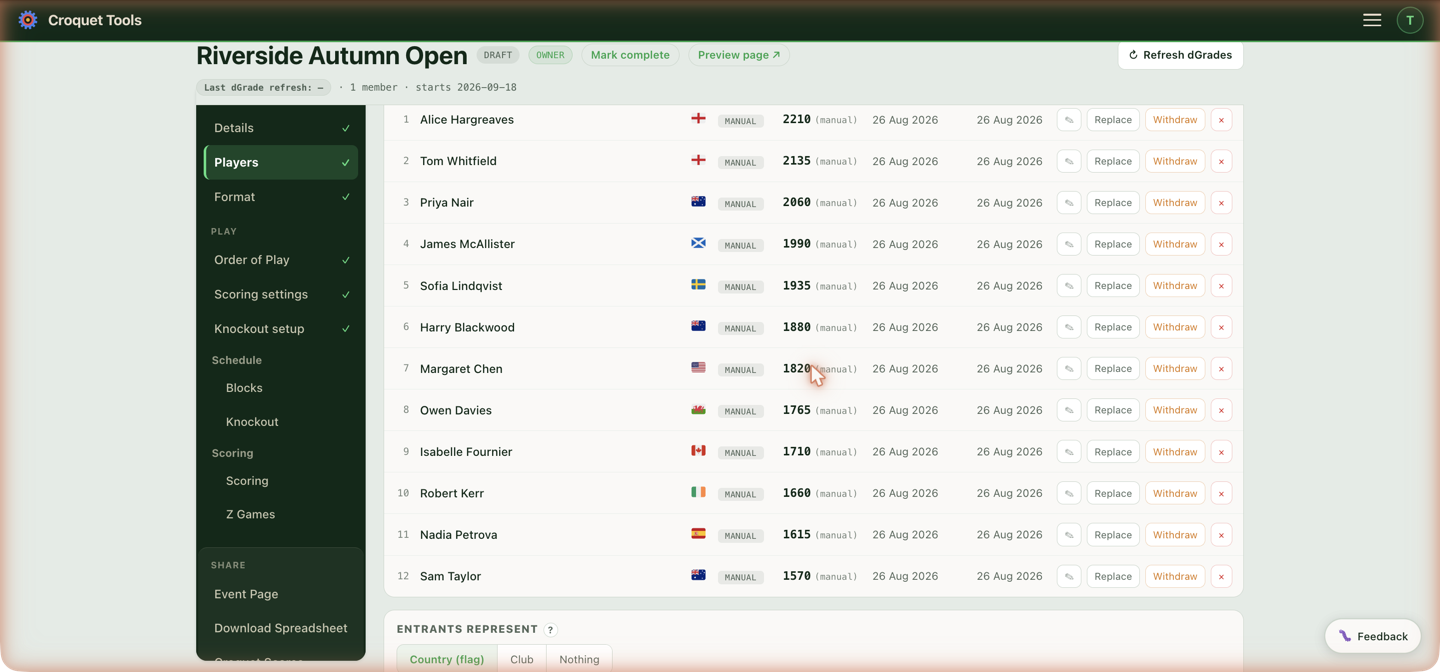
- ✎ Edit — name, country and dGrade. - Name at this event is the name shown on the roster, draws, order of play, event page and Print Pack. It changes in every competition the player is in, in their doubles pairs, and in the knockout draws, including games already played. - A ranked player keeps their WCF name for the WCF. Under the box is the name the WCF knows them by, for example "WCF name: TimM Wright" (the WCF adds a letter to tell two players with the same name apart). The WCF results export, both the download and the event's /rankings link, always sends that name, so "TimM Wright" can show as "Tim Wright" at the event and still reach the WCF as TimM Wright. Use it puts the WCF name back. - Two players in one event can't share a name: the save is refused and says who already has it.
- Replace — swap this entrant for a real player while keeping their block position, seed and schedule. Use it when "TBC" or a test player becomes a real name, or a substitute takes an entry before play. On an AC event the search looks in the AC rankings; on an American Six Wicket event the incoming player's name is typed in. - Every competition the player is in is replaced at once — someone entered in the Championship and the Plate is replaced in both. - Knockout draws follow: the incoming player takes the outgoing player's place in the draw and in every game not yet played. Games already played keep the name of whoever played them. - The draw record shows it: the swap is listed under "Changed by hand after the draw" on that draw's public record — for example "Seed 13: Ged Smolskas → Andrew Gregory · Substitute — replaced entrant". - A seeded place is flagged in the panel: the incoming player takes the seed. Redrawing in Knockout setup seeds the draw afresh instead. - If the outgoing entrant already has scored games, the panel warns and asks again before handing those results to the incoming name.
- Withdraw / Reinstate — marks the player withdrawn: games already played stay on record and in the WCF export, and their unplayed games are cancelled — they leave the to-score list. In a block, whether played games against them still count follows WCF Sports Regulations, Appendix 6 §3, and the confirmation says which way it went for each block, with the clause (see A withdrawn player's games); in a Swiss those results stand. Withdrawing a player who hasn't played anything removes the entry outright — there's nothing to keep — except in a Burridge Swiss that has been drawn, where the player stays on the draw, struck through, and their unplayed games are not played (see A withdrawal during a Burridge). A player entered in more than one competition withdraws from all of them, and the confirmation names them — someone who pulls out has pulled out of the event. Reinstate puts them all back. Singles and doubles are separate fields: a pair carries its own copy of both names, so it plays on after one of its players leaves the singles draw. The confirmation names any pair the player is in and says it's being left alone — withdraw or change it on its row in the Doubles roster.
- × Remove — deletes the entrant entirely. For players who never played; trying it on a player with scored games brings a warning that the results would be deleted, pointing to Withdraw instead. Doubles pairs are a separate field and aren't touched; the confirmation names any the player is in.
Someone pulls out mid-event? Withdraw, don't remove. Removing deletes their games; withdrawing keeps every result they played on record (and in the WCF export) and simply stops scheduling them.
Doubles pairing
For doubles (or "Both") events:
- ⇪ Copy singles players in — pull your singles roster into the doubles pool.
- Auto high-low — pairs the field by rating, strongest with weakest. Needs dGrades; unrated players are left for you to pair by hand (or give them an estimated dGrade first).
- 🎲 Random — pairs everyone still in the pool blind, no ratings involved. Press it again for a different draw: it re-draws the pairs it made and leaves every other pair alone, so your own pairings and anything Auto high-low balanced stay put. With an odd number, one player is left in the pool for you to place. Reload the page and it forgets which pairs were its own, after which it only draws whoever is unpaired.
- Tap two players to pair them manually.
- Already know the pairs? Add them directly as pairs.
The pairs list is numbered from the highest pair dGrade down — the order the blocks are seeded in. It re-sorts as grades change.
On an American Six Wicket event, add the players first (each with their handicap and tracking points), then pair them. Each player's numbers go with them into the pair, and the pair's handicap is worked out from the two by Pair handicap. Auto high-low pairs by handicap — lowest with highest, working inward, equal handicaps ordered by tracking points — and leaves anyone without a handicap for you to pair by hand. Both lists are numbered from the lowest handicap. ✎ on a pair opens a Handicap and TP box for each player, and ⇄ asks for the incoming player's handicap and tracking points. Splitting a pair returns both players to the pool with their own numbers. There is no Add pair card, since it searches the player database; an imported "A & B" row is the other way to bring in a pair.
× on a pair splits it: the pair's entry is deleted and both players go back to the pool. A pair with fixtures in the draw asks first — its fixtures are deleted with it and the block re-pairs. A pair with a scored game can't be split; the message points to Withdraw and ⇄ instead.
Doubles roster
Below Build the doubles draw, every pair has its own row with the same controls as a singles row:
- ✎ Edit — a country for each player, the dGrade, and the handicap. On an American Six Wicket event, a country, handicap and tracking points for each player; the pair's own Handicap and TP cells are worked out from them and can't be typed into.
- Replace — swap one player of the pair for another, keeping the pair's block position, seed, games and schedule (the same as ⇄ in the builder).
- Withdraw / Reinstate — withdraws the pair, as described for singles under The roster: games already played stay on record and in the WCF export, unplayed games are cancelled. Withdrawing a pair that hasn't played removes it.
- × Remove — deletes the pair; a pair with scored games warns first.
Also entered on their own — listed only when it applies: a player who plays in a pair and also has a separate row of their own, left over from an earlier entry. That row counts as an entrant but isn't in the draw; × Remove on it deletes that row only, and the pair is not touched.
A pair's dGrade is the average of its two players' dGrades, and pairs are seeded on it. When one player has no dGrade and no provisional one, the pair's dGrade is the other player's.
Provisional dGrade
A number given to a player who has no dGrade, used in working out their pair's dGrade. There are three ways to give one:
- Add pair — pick a player with no dGrade and a Provisional dGrade box appears under them.
- ✎ on a pair under Build the doubles draw — a box for each player without a dGrade; a player with one shows theirs.
- Before pairing — an estimated dGrade on a player in the pool goes with them into the pair as their provisional.
The roster marks a pair with a provisional in it (P). Refresh dGrades keeps it, and drops it once the player has a dGrade of their own. Blank a box to clear it.
| Pair | Player 1 | Player 2 | Pair dGrade |
|---|---|---|---|
| Jumper/Hopper | 1485 | no dGrade | 1485 |
| Jumper/Hopper | 1485 | 1250 provisional | 1368 (P) |
Entrants represent
Country (flag) / Club / Nothing — what shows beside each name on the public page, standings and exports. The help popover in the tool shows worked examples of each.
Beside each name
Which number goes with a name — on the roster, the public page, the printed Players and blocks and the exported Player rosters:
- dGrade — the rating. The default.
- Handicap — the handicap instead of the rating, for handicap and bisque events. The roster gains a Handicap column to type them into; a pair's handicap is the pair's, entered as one number.
- Both — the handicap and the dGrade side by side.
- Nothing — bare names.
On an American Six Wicket event there are no dGrades, so the choices are Handicap (Jimmy Jumper (7)), Tracking points (Jimmy Jumper (15 TP)), Both (Jimmy Jumper (7 · 15 TP), the default) and Nothing. The roster always has Handicap and TP columns to type them into, and no dGrade column.
An Advantage GC event shows both columns on the roster whatever is chosen here, since the handicap is what every target score is read from; the choice still governs the public page.
Tracking points
American Six Wicket events only. USCA tracking points sit beside each handicap in a TP column on the roster, typed in, entered on Add player or brought in by Import a list. Whole numbers, either sign.
They are printed beside the name on the public page and the print pack when Beside each name is set to Tracking points or Both. Either way, tracking points break ties between equal handicaps, highest first: a 7 on 15 points is placed above a 7 on -5 when Auto-assign splits the field into flights and when blocks are snake-seeded. Typing a new handicap into the Handicap column sets that player's tracking points to 0, since a handicap set by the tournament director starts fresh; type a different number into TP afterwards to change it.
A player who chooses to play up or down a flight is moved by hand after the split, and a block seat is changed with the seat picker on the Format tab.
Level or handicap play
American Six Wicket events only. Whether the event's games are played level or with bisques: Level play or Handicap play. It is asked when the event is made (Create an event) and can be changed here at any time.
Scoring, standings and the draw work the same either way. What it changes is the table USCA tracking points are scored from:
- Level play — +8 to −4 per game, by the handicap gap. Beating a lower handicap earns most: a 6 beating a 4 earns +8, a 4 beating a 6 earns +1.
- Handicap play — +2 for a win and −2 for a loss, or ±1 when the two handicaps are 5 or more apart. A 6 beating a 4 earns +2.
An event made before this setting existed shows it outlined until one is picked.
Pair dGrade
Shown on doubles events. Which number a pair shows — on the roster, blocks, the exported rosters, player packages, the print pack and the public page:
- Average — half the two players' dGrades added together. The default.
- Combined — the two added together.
| Player 1 | Player 2 | Average | Combined |
|---|---|---|---|
| 1485 | 1250 | 1368 | 2735 |
| 1900 | 1800 | 1850 | 3700 |
Combined is twice the average, so pairs are seeded in the same order under either setting. The average is stored rounded to a whole number; the combined figure is the exact sum.
On an American Six Wicket event this setting is Pair handicap instead.
Pair handicap
American Six Wicket doubles only, in place of Pair dGrade. The handicap and tracking points a pair carries, worked out from its two players' — on the roster, blocks, the print pack and the public page, and the numbers flights and blocks are seeded on:
- Average — half the two handicaps added together, to the nearest half; the tracking points averaged, to the nearest whole number. The default.
- Combined — the two handicaps added together, and the two players' tracking points added together.
| Player 1 | Player 2 | Average | Combined |
|---|---|---|---|
| 4.5 (16 TP) | 7 (3 TP) | 6 (10 TP) | 11.5 (19 TP) |
| 2 (-4 TP) | 3 (8 TP) | 2.5 (2 TP) | 5 (4 TP) |
The pair's handicap stays blank until both players have one. Changing the setting recalculates every pair in the event. Pairs come out in the same order under either setting, apart from ties.
Import a list takes each player's numbers from a pair row written "Jane Smith 4.5(16) & Bob Jones 7(3)", or a handicap cell "4.5 & 7". A pair row with a single handicap gives the pair's own handicap, typed in as one number.
Who plays in which competition
With more than one competition and unassigned players, the tool proposes a split by dGrade — e.g. top half to Championship, rest to First Flight. Apply this split, put Everyone in both, Adjust… the boundary, or Place them one by one. Competitions fill in the order they're listed on the Format section, so put the top competition first.
Test data
Test events get an extra card: add N generated players in one click, and clear them again. Handy for trying a format at realistic size before entries open.
On an event made from the WCF GC World Championship template, + Add test players starts at 80 and adds a field shaped like a World Championship, from players with games in the last 12 months:
| Places (of 80) | Who |
|---|---|
| 40 | Ranking: the highest dGrades, no more than 5 from one country |
| 2 per member country | Nominations: each country's best still free, strongest countries first |
| 6 | Host: the next best from the event's country (set on Details) |
| 4 | Qualifiers: from just below the field, only from countries with fewer than 5 places, fewest places first |
| 2 | Wild cards: developing players, dGrade 1400 to 1750 |
Other sizes scale these shares. Each press varies the field a little: every dGrade gets up to 60 points of random weight before players are picked. With no event country set, the host places go to the next best players.
Generated players arrive with invented dGrades and, from those, a handicap read off the published dGrade bands — so an Advantage GC event can be set up and played through on test data without typing a handicap column by hand. Add a real player to a test event and their own handicap is left alone.
Common tasks
- Entries came in by email — paste the names into Import a list rather than adding one by one.
- A player has no world ranking — manual add with an estimated dGrade; refine the estimate later with ✎.
- Late substitute after the draw is made — Replace on the outgoing player's row keeps the slot, seed and schedule intact.
Related
- Advantage Golf Croquet — what the Handicap column feeds, and how a missing handicap is derived.
- Format — blocks and seeding built from this roster.
- Details — the dGrade cutoff date, if you've told players seedings lock on a date.