What this section does
Details holds the event's identity: what it's called, when and where it runs, who can see it, and who helps run it. Most of it is set once and left alone — but the venue and lawn list matters all through scheduling, so get that right early.
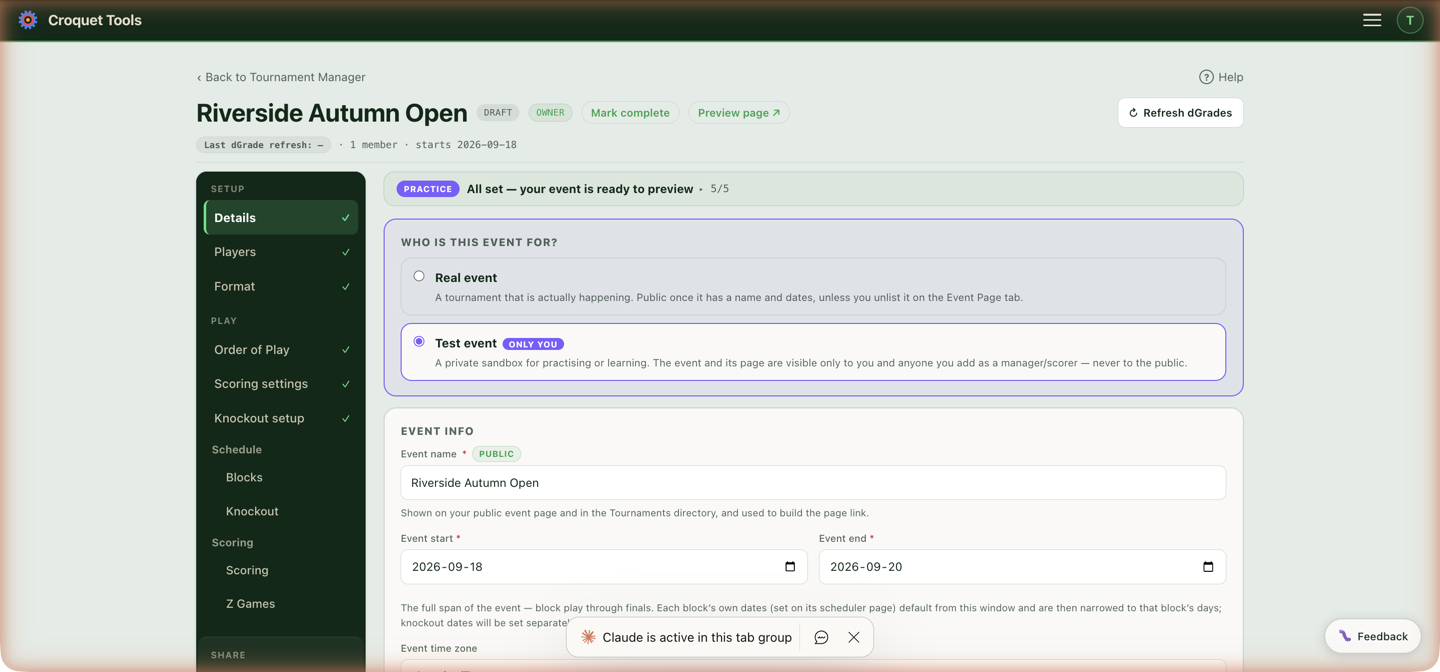
Settings
Who is this event for?
Two choices, changeable at any time:
| Choice | What it means |
|---|---|
| Real event | Actually happening. Publicly visible once it has a name and dates, unless you unlist it on the Event Page section. |
| Test event | Badged ONLY YOU — a private sandbox visible only to event members. Never listed publicly. Test players and generated scores are available. |
Event name
Used everywhere: the manager, the public event page, and the public directory. The public link is built from it (you can edit the link separately on the Event Page section).
Event start / Event end
Set the year for the public link and directory, and the window the schedule works inside — block dates derive from this. Both dates are required here; for a one-day event set them to the same day (the creation wizard does that for you when you leave its end date blank).
Event time zone
The full time-zone list; defaults to yours when you create the event. Every scheduled time, export and event-page time uses it. If you're building an event in another country, set this before generating a schedule.
Event country
Drives the country search in the public events directory. On an AC event it is also the country code at the start of every Event line in the ranking results file.
dGrade cutoff date
Optional. After this date, Refresh dGrades warns before re-pulling ratings. Use it when you've told players "seedings are based on ratings as of <date>" — it stops a late refresh from silently re-ordering the field.
Venues & lawns
Tick the venue(s) this event uses; add your club if the list is empty. Per venue you can rename, delete, and Make default (the current default shows an Event default pill). Lawns are chips under each venue — rename them, remove them, or Add lawn (e.g. "Court 3"). At least one lawn is needed before scheduling.
Lawn names appear on the schedule, the printed sheets, the display board and the public page — name them what players will see painted on the sign, not internal shorthand.
Managers of this event
Everyone with access, each with a role:
| Role | Can do |
|---|---|
| 👑 Owner | Everything, including managing members and deleting the event. The creator. |
| ✏️ Manager | Edit everything except membership — inviting, role changes and removals stay with the owner. |
| 🎯 Scorer | Enter scores only — setup sections are read-only. |
| 👁 Viewer | Read-only. |
The owner invites by email with a role; pending invites can be re-copied as a link or cancelled, and the owner can change roles or remove members. Any member can Leave themselves.
Duplicate event
Copies the event's competitions and blocks into a new event — with or without the player roster. The fast way to set up this year's edition of last year's event.
Delete event
In the Danger Zone for a reason: permanently deletes the event and all of its players, competitions, blocks, schedule and exports. There is no undo.
Common tasks
- Running the same event annually — open last year's, use Duplicate event, and update the dates.
- Adding a second club's lawns — tick the second venue and its lawns here; which lawns each day actually uses is set on the Schedule section, and Venue by day in Schedule adjustments sends one competition or block to the other club for chosen days.