Download Spreadsheet
Download Spreadsheet in the rail is an action, not a page — it opens the export chooser wherever you are. Tick what you want in the one .xlsx:
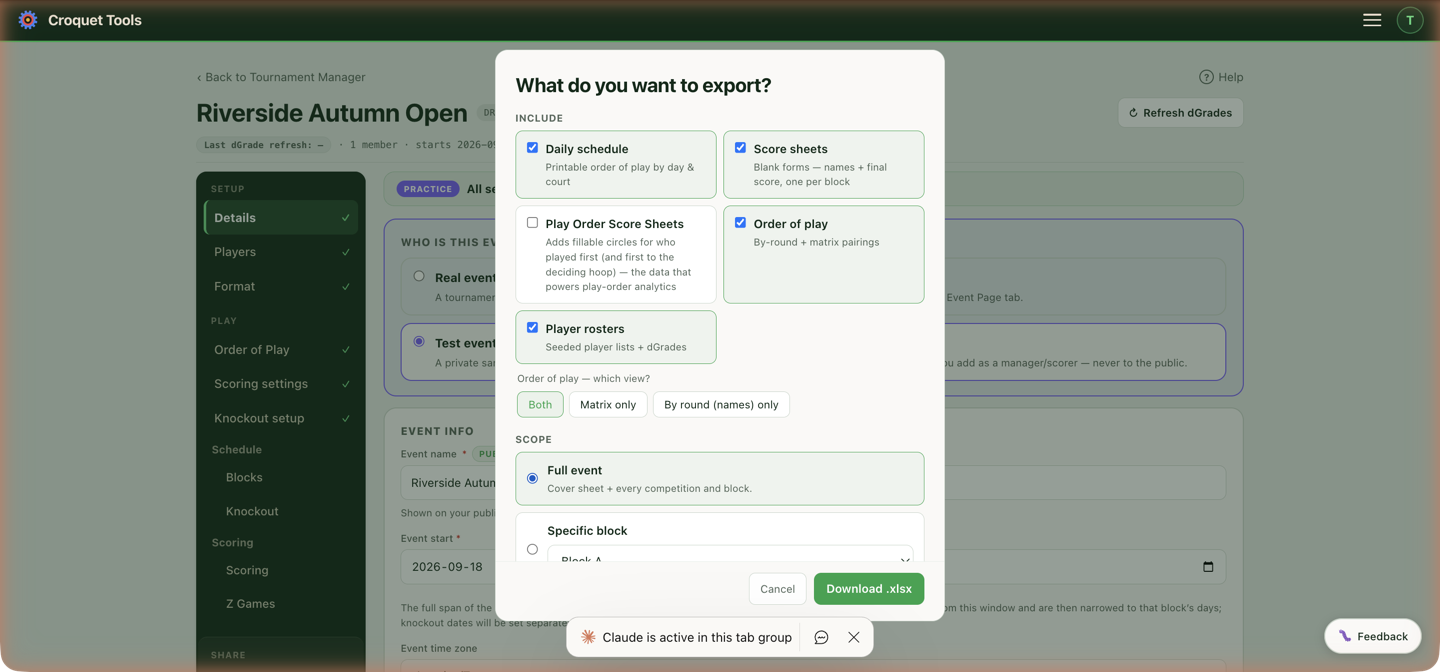
- Daily schedule — a printable order of play by day and court, one sheet per competition and day. Knockout games with a day and time are on it too, with KO and the match number in the Block column. Each game has a blank Result column, and the sheet is filled out with ruled blank rows for games written up on the day.
- Score sheets — blank forms with names and a final-score box, one per block.
- Play Order Score Sheets (GC events) — the same, plus fillable circles for who played first.
- Order of play — the pairings: Both, Matrix only, or By round (names) only.
- Player rosters — seeded player lists. The number columns follow the event's Beside each name setting: dGrade, Handicap, both, or neither.
Scope narrows it to the full event, one competition, or a single block — so the desk can print one block's sheets without the rest. A single block's order of play can also be exported from its row on Order of Play.
Bracket sheets print from their own Download button on Knockout setup.
Player Packages
Per-player PDFs — one page per player with their schedule, handed out at registration.
- Package header — the Event title and optional Sub-caption lines at the top of every package.
- Notes — bulleted or paragraph text with a Scope: event default, per competition, or per block. The most specific scope wins, so a general welcome note can coexist with one block's special instructions. Where a page covers two competitions, a block note on either of them wins over a competition note, which wins over the event note.
- Under each name — the player's country, dGrade and competitions. A pair's sheet shows the pair's dGrade as the event's Pair dGrade setting says: the average, or Combined dGrade — the two added together.
- Players — select who to generate for; Generate selected or Generate all (1 PDF) for a single print run.
Player packages need blocks: schedules are built per block, so add players and assign them first.
One sheet per person
An event with a singles and a doubles gives a player who is in both two entries — their own, and the pair. Two buttons decide how that prints, and they only appear when somebody in the event holds more than one entry:
- One sheet per person — one page each, carrying every competition they are in. Once the schedule is generated the games are listed in the order they play them, across both competitions, with a Competition column; byes are named underneath, since a bye has no time to sit at. Before the schedule exists the page holds one round-by-round table per competition.
- One sheet per competition — a page per entry, so a player in both gets two.
A doubles pair whose members have no singles entry keeps its own sheet under the pair's name, because a pair row carries surnames only — there is no full name to head a page with. That is what a doubles-only event prints either way.
Each package row prints the game's scheduled date, time and lawn. Times come from the schedule, and the schedule is an order of play — see Printed output for how times are framed on the other printed surfaces.
Print Pack
Print Pack in the rail lists the event's printed documents. It appears once block games have times or a knockout has been built. Each Open ↗ opens one document in a new tab; its Print / Save as PDF button opens the browser's print dialog, where Save as PDF keeps a file, named after the document (Order of play — Croquet Tools.pdf). Nothing on the page changes the event, and each document reads the schedule when it opens — one opened before a change is out of date after it.
- Player schedules — a page per player, their name at the top with the event name under it (and its venue when the event is at one venue), then a table per competition: day, time, lawn and opponent. Doubles come first, with the partner named in the heading, then singles. A player in both is one page. Pages run in surname order. A doubles player with no singles entry is named as the pair's entry names them.
- Players and blocks — every competition's blocks with their players in block seed order, each with their dGrade and a Block average under the column. A doubles team shows both players with their own dGrades and a Combined — the two added together — and its block average is of the combined grades. A doubles player's own dGrade is the one on their singles entry in the event; a player with no singles entry takes their current ranking dGrade. A cross-block competition names its pairing beside the heading (cross block: A v B). The number columns follow the event's Beside each name setting: a Handicap column when the event shows handicaps — a pair's is the pair's own — and the dGrade column, with its Combined and Block average, when it shows dGrades. A dGrade the manager entered as provisional is marked (P) beside it; with no dGrade column there is no (P). An event whose competitions are all Swiss prints this as Players — the field in seed order — rather than Players and blocks. A competition with one block or pool prints its list full width at a larger size, a pair on one line when no dGrade column is shown.
- Order of play — the sheet for the board. A page per day, every competition together: time, lawn, competition, block, the two sides, and a blank Result column to write the score in. Games already scored are left off, so a sheet printed mid-event lists what is still to play. Knockout games with a day and time are on it with their match number in the Block column (C3, as on the bracket sheet), and a side not yet known prints as its placeholder (Winner C3, A1); once C3 is decided its winner prints by name. The rest of the page is ruled blank rows, for games written up during the day — never fewer than eight. On an Advantage GC event each side has a To column with its target, read from the handicaps as they stand when the sheet opens; a knockout game shows targets once both its players are known.
- Score sheets — a page per block, for the scorer: every scheduled game with day (where the block spans more than one), time, lawn, the two sides and a blank Score box each, rows tall enough to write in. An AC event has one Result box instead, written from the winner's side. On an Advantage event each side has its To target and the row ends with Draw at — the scores at which a game stopped on time would be a genuine draw, or a dash where the two targets share no factor.
- Singles block schedule and Doubles block schedule — every block game of that kind by day, then time, then lawn, with each day starting a new page. Competitions of one kind are intermixed; the Comp column carries the part of the name that tells them apart (Championship Singles → Championship), and the Block column the block letter — A v B for a cross-block game, blank when the competition has one block. An event with only singles or only doubles has one Block schedule. With a single competition the Comp column is left off, since it would repeat one name on every row.
- All brackets, and a document per knockout — a landscape page per draw, or for a draw with more than eight first-round matches (a 32-draw and up), a page per part: top half and bottom half, with the final drawn on the bottom-half page. Each match box carries its match number, the planned day, time and lawn, and the two sides, one to a line; a name too long for the box is condensed to fit. A side seeded from a block shows the player once that block has a finishing order — the same names the event page shows — and a placeholder until then: A1 is Block A's 1st place. A side fed by an earlier match shows the winner's name once that match is decided; until then it is a blank line with the feed (winner C3) faint at its end, for the pen. Each round is headed with its format (one game · 19-pt, best of 3 · 13-pt). A double elimination is one page: the winners bracket, the losers bracket under it, and the grand final under the last losers round. A team dropping from the winners bracket is named in its losers-bracket box (Loser W2) rather than drawn with a line.
- Event page QR code — one page for a noticeboard or the clubhouse door: the event name, its dates (and its venue when there is only one), Link to Event Details, a large QR code to the event page, the line Scan for the schedule, players, results and live scores, and the page's address printed underneath for anyone who can't scan. While the event is a test or not listed, the code and the address carry the private preview link, so anyone who scans it can open the page. It appears once the event has a public link — a name and a start date.
Every page carries a small Croquet Tools mark and www.CroquetTools.com in the bottom margin. The browser's own headers and footers — the page address and date — are a setting in its print dialog (Headers and footers in Chrome). The bottom-margin mark and the page margins need Margins left at Default; None prints the sheet to the paper's edge with no mark.
| Document | Paper | Pages |
|---|---|---|
| Player schedules | A4 portrait | one per player |
| Order of play | A4 portrait | one per day |
| Score sheets | A4 portrait | one per block |
| Block schedule | A4 portrait | one or more per day |
| Brackets | A4 landscape | one per draw; two for a 32-draw |
| Event page QR code | A4 or Letter portrait | one |
Related
- Schedule — where the times being printed come from.