What this section does
Every competition inherits the event-level plan unless you override it in Adjust. An example: doubles blocks on the weekend, singles midweek — same event, different dates. Each row shows what it currently does ("Inherits — 55 min"); toggling a field on gives that competition or block its own value.
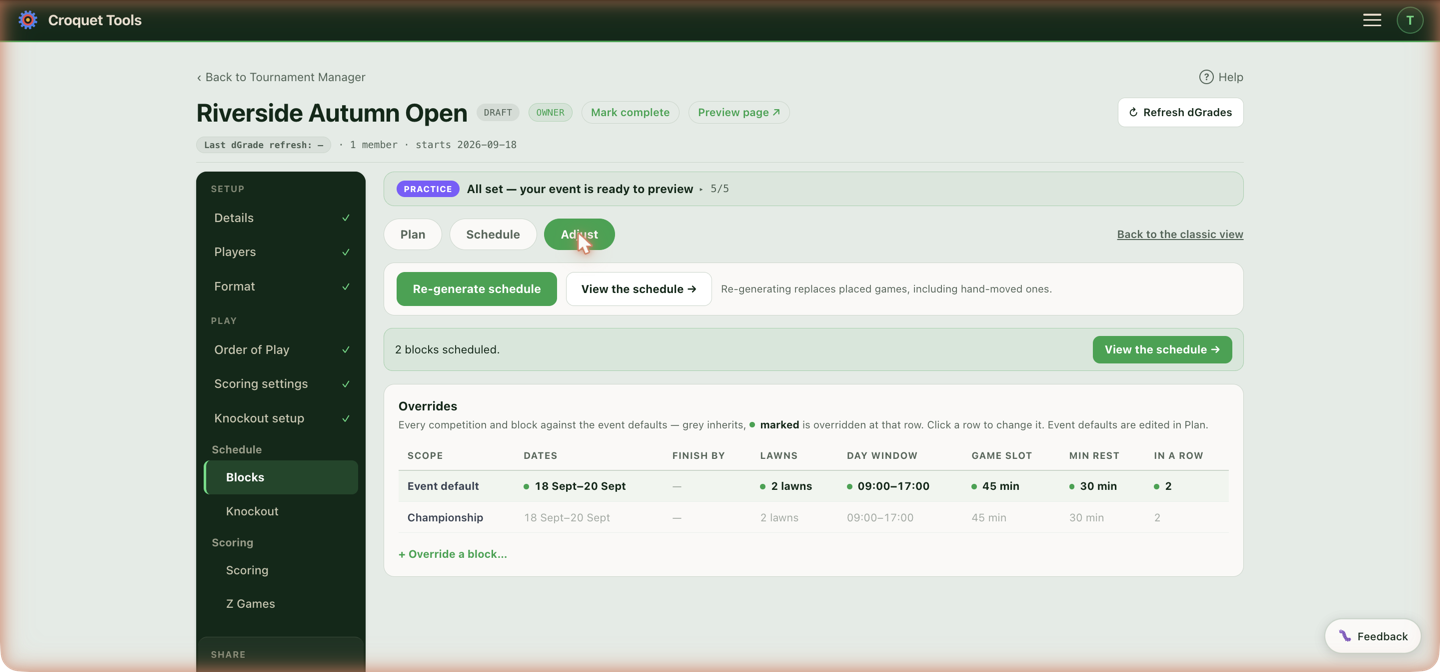
What can be overridden
Per competition or per block:
| Field | Overrides |
|---|---|
| Dates & deadline | Its own Start and Finish by dates, plus a finish-by time |
| Lawns | Which lawns it may use |
| Venue by day | Which venue it plays at on each day (multi-venue events only) |
| Daily play window | Its own Day start / Day end, and different times on some days |
| Time per game | A different game slot (e.g. doubles run longer) |
| Max games in a row | Its own back-to-back cap |
| Min rest between | Its own rest floor |
| Matches per player per day | Its own At least floor (reporting only; the competition's last day is not judged) and At most cap (blank = no cap) |
| Balance across lawns | On/off for this competition |
| Double-banking | Single-banked / Share only if the event will not otherwise fit / Share to keep each round in one time slot / Always double-bank, with its own Stagger (min) |
| Output | Its own printed-times mode |
Anything left un-toggled keeps inheriting — change the event default later and it flows through.
Venue by day
Shown when the event has more than one venue ticked in Details. Lawns above sets one pool for the whole run; this sets a venue per day, and on the days it answers it replaces that pool.
Each day of the competition or block gets a dropdown. Default — lawns above leaves the day on the pool from Lawns. When that pool spans more than one club, a block still plays at one club that day: the club Blocks at a venue per day shows in its Default cell. Picking a club moves this competition or block there for that day alone and takes all of that club's lawns; the lawn chips beside the dropdown untick the ones it should not have, which is how two blocks share one club on the same day. At least one lawn always stays ticked — a day with none would place no games.
Two blocks swapping clubs is two independent settings, one on each block:
| Set on | Monday | Tuesday |
|---|---|---|
| Block A | Riverside | Northgate |
| Block B | Northgate | Riverside |
A day with a venue set ignores the event-level per-day lawn closures and opening times from Schedule ▸ Lawns in play. Those describe the event venue's lawns, not the club this block has moved to — so a lawn out for maintenance at the other club is unticked here, on the day's chips.
Per-day settings are held per tier, not merged across tiers: once a competition or block has any of its own, the event's per-day times no longer reach it. Where that matters the panel says so, and Daily play window is where those times are re-entered.
Blocks at a venue per day
Shown under the overrides table when the event has more than one venue with lawns. Every block is a row and every day of the event a column, so the whole draw round the clubs is set in one place. Each cell is that block's Venue by day for that day: the same setting as above, written for you.
A block never plays at more than one club on a day. Its games that day all go on one club's lawns, so no player travels between clubs mid-day; on another day the block can be at another club.
- Default sends the block to the club the rotation gives it — the same order as Rotate clubs below — and the cell names that club, for example "Default · Gezira". Only clubs with lawns in the block's pool take part.
- Picking a club sends the block there for that day, on all of that club's lawns. Two blocks on the same club on the same day share its lawns. Narrowing a day to some of a club's lawns is done on the block's own row above; the cell then says, for example, "2 of 3 lawns".
- Rotate clubs fills every cell: the first block starts at the first club, the second block at the second, and each block moves one club along each day. With as many clubs as blocks, no two blocks share a club on any day. It asks before replacing cells already set.
- Clear all puts every cell back to Default.
Keeping a block to one club means a day's games share that club's lawns only. A block of ten plays five games a round, so on a two-lawn club each round takes three time slots; if the schedule reports rounds that did not fit, the day needs more time slots (a later end, a shorter game slot) or the block a bigger club.
A block given its first venue day here keeps the event's per-day times: they are copied onto the block, because per-day settings are held per tier. Press Re-generate schedule afterwards to place the games at the new clubs.
| Block | Sat 21 Nov | Sun 22 Nov | Mon 23 Nov |
|---|---|---|---|
| Block A | Gezira | Heliopolis | Zamalek |
| Block B | Heliopolis | Zamalek | Gezira |
| Block C | Zamalek | Gezira | Heliopolis |
When to reach for it
- A competition on its own days — override Dates so the solver never mixes it into the other days.
- Doubles need longer games — override Time per game for the doubles competition only.
- Doubles every morning, singles every afternoon — a Daily play window on each competition; see the worked example.
- One block of beginners — a gentler Max games in a row for that block alone.
- A small block that must finish in two days — a block of five plays five rounds, so under an event cap of 2 matches a day it takes three days. Override Matches per player per day to 3 for that competition and it fits in two.
- A far lawn for one flight — override Lawns so a competition stays on one bank.
- Blocks that move club every day — Rotate clubs in Blocks at a venue per day, then adjust any cell by hand.
- A second club for half the event — override Venue by day so one block plays the Monday at the other club and comes back on the Tuesday, while another block does the reverse. Everyone in a block moves together; there is no per-player setting.
Example: doubles in the morning, singles in the afternoon
One event with a Doubles competition and a Singles competition, where every day's doubles games are placed before lunch and the singles block games after it. Each competition gets its own Daily play window:
| Competition | Daily play window | Effect with 45-minute games |
|---|---|---|
| Doubles | Day start 09:00, Day end 11:15 | Doubles games start between 9:00 and 11:15, so the last finishes by about 12:00 |
| Singles | Day start 13:00, Day end 16:15 | Singles games start between 13:00 and 16:15 |
Day end is the latest a game may start, not finish, so it is set one game slot before the time the window should close. Because the two windows do not overlap, a player entered in both never has a doubles and a singles game at the same time. A round that does not fit in its competition's window moves to that competition's window the next day; it is never placed in the other competition's hours. If the doubles run a different length of game, Time per game is overridden on the same row.
An event started as singles gets its doubles draw by switching Event type to Both on Players, where the pairs are then built (Doubles pairing). Press Re-generate schedule after setting the windows.
Gotchas
Overrides feed the next generate. Changing them doesn't move already-placed games — press Re-generate schedule afterwards (which replaces hand-moved games, so save a version first).
Related
- Schedule — the event-level plan these override.